Mike Dickman

Today's Most Relevant Digital Marketing Content

Mike Dickman

Crash Course on Mobile Advertising Formats, Trends & Projections

By Elena Terenteva of SEMrush and first published on WsbsiteMagazine.com.

Can you believe it?

It hasn’t even been 10 years since we got the first iPhone.

And yet in the last 12 months we spentmore time consuming content on mobile devices than watching TV, for instance. And according to comScore, last year U.S. users spent 7 out of 8 minutes of media consumption on mobile devices.

It comes as no surprise then that mobile marketing grows at the fastest pace among digital advertising formats today.

And there is a lot of data to prove it.

According to BI Intelligence for instance, U.S. mobile ad spend will top nearly $42 billion in 2018. Statista predicts that worldwide spend on mobile advertising will reach $59.67 billion in 2017.

As Atul Satija, VP of InMobi, a mobile advertising platform says:

“Advertisers and ad tech companies are convinced that mobile will be, if not already is, the dominant platform for consumer engagement.”

So what are the general forecast and best practices for the mobile advertising industry?

Mobile Advertising Adoption Rate

Up until recently there has been a major disparity between the adoption of mobile devices and the amount of money spent to advertise on them.

One reason for that may have been a poor cross-device attribution model and higher conversions on desktops.

Commentators have also claimed that the disparity might be caused a lack of confidence in mobile security when entering credit card information. With the rise in popularity of digital wallet applications like 1Password, these reservations might be going away soon though.

And as BI Intelligence predicts, this gap will close very quickly as more advertisers discover how to use the platform.

Mobile Ad Performance

IMPRESSIONS

In their recent research Medialets found that customers prefer to use smartphones rather than tablets. And thus ads displayed on smartphones achieve much higher impression rate (88.3 percent) while those showing on tablets account for only 11.7 percent.

Similarly, users prefer to use apps more than browse the Web. App usage, according to Medialets is now at 58.2 percent while the Web is at 41.8 percent.

It comes as no surprise though since 45 percent of U.S. mobile marketing campaigns involve app downloads.

VIEW-THROUGHS

When discussing impressions and performance it’s important to note that view-throughs could lead to conversions.

According to Medialets’ report, view-throughs can increase overall conversion by:

• 288 percent for page views,

• 162 percent in case of downloads and,

• 157 percent for purchases.

CLICK THROUGH RATE (CTR)

In spite of the smartphone dominance, ads showing on tablets achieve a much higher click-through rate (source).

The average CTR on tablet is 0.59 percent while handset – 0.41 percent.

Similarly, ads displayed in apps achieve a significantly higher CTR (0.56 percent) than their Web counterparts (0.23 percent).

Ad formats

VIDEO

Most of the recently conducted research agrees – video is going to be the fastest growing ad format.

According to Medialets, embedded video is the most popular feature used in 56 percent of all rich media campaigns.

And according to Forbes by 2018 mobile video will represent 69 percent of all mobile traffic (in comparison, it stood at 53 percent in 2013).

eMarketer on the other hand reports that spending on mobile video ads has already exceeded $1B in the U.S. last year (source).

Yet, in spite of that, BI Intelligence predicts that search and social combined will account for the largest share of U.S. ad revenue.

According to the research:

“Search is a strong format on mobile because of its convergence with local-mobile targeting. “

NATIVE ADVERTISING

In September 2014 Rubicon and inMobi conducted a Mobile Native Advertising Survey, discovering that the demand for mobile native ads is larger than ever.

And it’s expected to grow further in 2015.

Why? Because, according to the survey, native mobile ads deliver six-times greater conversions for brands and marketers over traditional banner ads.

MOBILE PROGRAMMATIC CAMPAIGNS

Programmatic technology has already proved itself in driving new revenues and increasing ads’ effectiveness.

Programmatic ad revenues will grow, according to BI Intelligence, from a mere 6 percent in 2013 to account for 43 percent of U.S. display-related ad revenue. Another BI Intelligenceforecast also predicts real-time bidding ad sales to reach $1.4Bn this year and $6.8Bn by 2018.

What to expect from mobile advertising this year

VIDEO WILL BECOME THE MOST ENGAGING AD FORMAT

Rich media ads are already three times more common as banners (source) and to no surprise. They generate a much higher user engagement. On average, rich expandable units increase the duration of a person’s engagement with a brand by 16 seconds.

Moreover, videos enjoy a low 33.9 percent completion rate. 91.8 percent of users however will watch the first 25 percent while 80.3 percent will see 75 percent of the video.

Brands therefore should focus on getting their key message across as early in the video as possible.

BUDGETS WILL SHIFT TO PROGRAMMATIC BUYING

Matomy predicts that in 2015 and beyond, marketers’ focus will shift from improving brand awareness to optimizing ad performance. That will increase the need for optimized ad buying will increase.

Using various first and third-party data will allow advertisers to improve the efficiency of ad buying while improving their performance, proving return on each dollar spent.

MOBILE NATIVE ADVERTISING WILL OUTPERFORM DISPLAY

Native advertising outperform banner ads and will drive the engagement in mobile ads.

Customers want better experiences from brands. Eighty-five percent say that they visually engaged with native ad presented in a stream of content (source). The same people are also two times more likely to say they don’t care if content is an ad, as long as it’s engaging.

And thus, mobile is becoming a more natural environment for native advertising.

Final Projections

Mobile advertising is the future. Video, social media or native advertising are going to shape the future of advertising in the coming months.

And with the number of global mobile users already exceeding desktop, it’s no longer a questions whether to start advertising on mobile or not but how.

How to Create Customer Feedback Loops at Scale

By Ott Niggulis and first appearing on ConversionXL.

How to Create Customer Feedback Loops at Scale

According to a study by Bain & Company, 80% of companies say they’re customer centric, yet only 8% of customers agree.

Think about that for a second.

How many of your customers do you think would agree that you are customer centric? Do you know for sure?

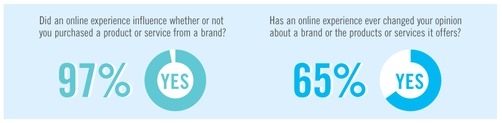
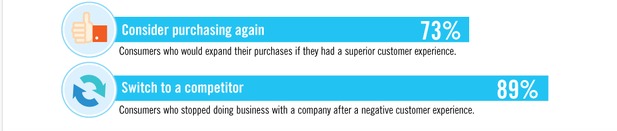
This is important because according to a study by Monetate, 79% of customers will buy from a company again if the experience is good, but 89% of them would switch to a competitor if the experience wasn’t satisfactory. And nearly everyone agreed that the online experience influences their decision to buy.1
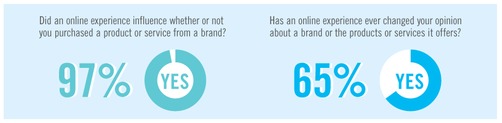
Going back to the Bain & Company study, I wonder how so many businesses can be so off the mark when it comes to how their customers perceive them.

Reflecting on my own experiences as a customer both on- and offline, I think it’s due to the missed opportunities where they could have asked from my feedback but didn’t.

  • Welcome emails
  • First purchase emails
  • Companies I’ve been buying from for years
  • Companies I’ve been subscribed to, but never bought from

Most don’t even seem to acknowledge they’re using a channel where it’s easier for me to reply than it was for them to send.

It’s especially bad for online purchases. You already have my contact info, you know exactly what I bought – why not use that info and ask me for feedback about the product you just sold me?

Wouldn’t this only help you to hone your upsale offers, or collect testimonials, or know what to test next?

Given that the research shows considerable revenue lifts for companies who invest those areas – and the drawbacks seem to be pretty terrible if the customer experience isn’t a good…2
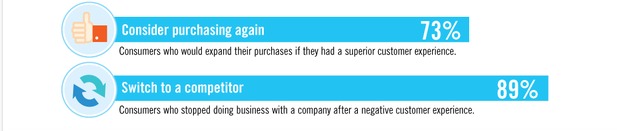
…it seems to me the benefits only compound for you if you took a quick break from pushing sales & just asked

“Hey, why did you (or didn’t you) buy from us?”

Perhaps it’s apathy. Or fear of getting real feedback? Or an inflated sense of self-importance that trickles down from the C-Suite that makes you think you know what I want so well that you can’t be bothered to ask me for my feedback.

Or maybe it’s innocuous & you think there just isn’t the time to collect feedback?

If that’s the case, keep reading – because most feedback gathering can be automated & integrated at nearly every point of your customer’s lifecycle.

With the right framework, and a little strategic thinking, you’ll be gathering feedback from all manner of leads & customers.  If you actually act upon the feedback you collect, it can be used to influence & transform your business on every level.

Understanding The Feedback Loop

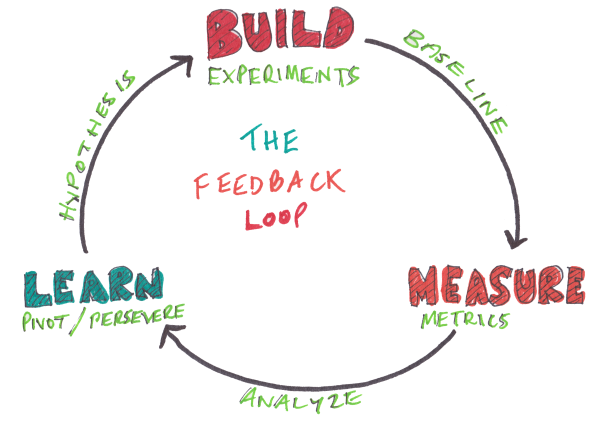
At it’s core, a feedback loop is a system that helps companies to gather external information about their services/products, add to that their own internal hunches and insights and in the end improve the service/product they were offering in the first place.3image credit
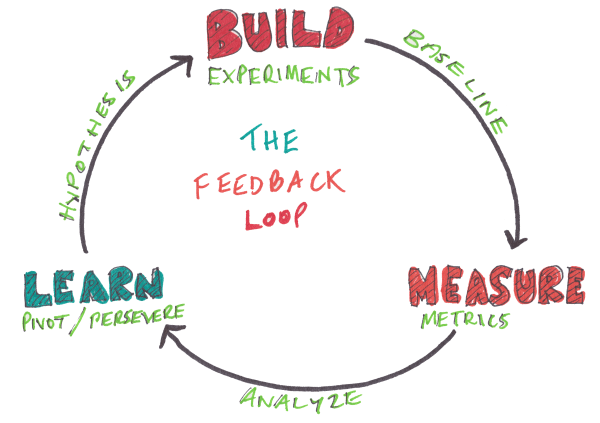
By building feedback experiments, measuring results and extrapolating insights, the goal is to learn something specific about your different visitor, lead & customer segments to improve some other area of your business.

For example, if you wanted to form more strategic partnerships, you might automate a survey that goes to the customers who have been buying from you for 6 months.

Why do they shop with you? What’s their lifestyle like? Where else do they shop online? Each of these questions can lead you to new partnerships & as your customer base grows, you will be provided with a continual source of new insights.

Do NOT Limit This To One Area!

You should be looking to gather feedback at every opportunity possible.

Some ideas include

For Non-Customers

  • Interactive chat or surveys on high touch sales pages (whichever drives more response)
  • Interactive surveys on category pages (help refine your content strategy by category)
  • Triggered survey for non-logged in returning visitor who has navigated multiple pages on site

For Leads

  • The moment they subscribe to your email list or
  • Right after they’ve consumed your lead magnet (Read: Optimizing your Autoresponder)
  • If they haven’t opened an email in some time
  • If they open, click, but never buy

For Customers

  • After buying their first product from you
  • After buying multiple products from you or
  • After buying from you for several months
  • Customer feedback forums
  • Interactive chat inside the app

For Former or Non-Converting Customers

  • When they haven’t bought for a while
  • If they didn’t become customers after free trial

Hopefully it’s easier to see how really getting specific with who you’re trying to get feedback from can reveal insight for each type of lead & customer.

Depending on the goals of your feedback loop, this insight might be used to reduce churn & improve customer lifetime value, preemptively address major customer service issues, improve ux & design flows, convert more leads into customers, orrework your value proposition to further distinguish you from the competition.

::ahem:: This seems to be an appropriate time to remind you to stop putting offsegmenting your customer database.

Getting Feedback From Non-Customers

Visitors to your websites can be a great source of feedback, but you don’t have any identifiable information about them (no email, social profiles etc), you have to get the info on the spot.

For that you can use either on-site survey tools or live chat (for high touch pages).

The advantage is that while they are there to mainly help guide visitors to the right resources, you are also constantly learning on what is not clear, what needs improvements, what can be removed and so on – effective feedback loop in action.

On-site Surveys In Action

On-site surveys can be used to direct visitors to the right pages by asking questions related to or feedback on whatever is displayed on the page.

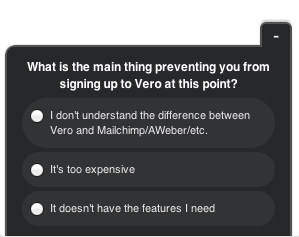
Vero uses this to great effect on their landing page. After being on their landing page for more than 30 seconds without taking action, the following pop-up will appear:4image credit
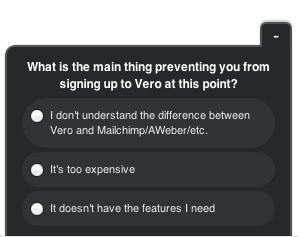
Depending on which answer they choose, they will get a different call to action. For example when you click on the first option, you will be greeted with this:5

This gives them an opportunity to survey their visitors without asking them to fill anything in.

It is there to help, but at the same time it gives better understanding of what are the reasons that people navigate away. Using this data allows Vero to refine their copy strategy without “guessing”.

How NitroPDF does it

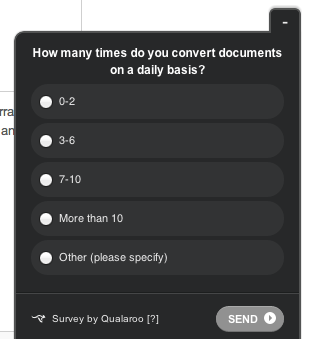
NitroPDF uses the same tool a bit different, instead of trying to answer possible questions, they are using it to better understand their visitor’s behavior:6image credit
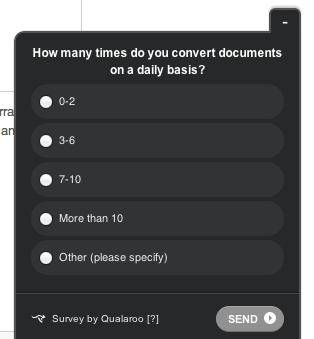
This example pops-up on their pricing page. The question is very specific and allows them to get data on the needs of their potential customers which they can later use throughout the site.

Service providers:

On-site Live Chat In Action

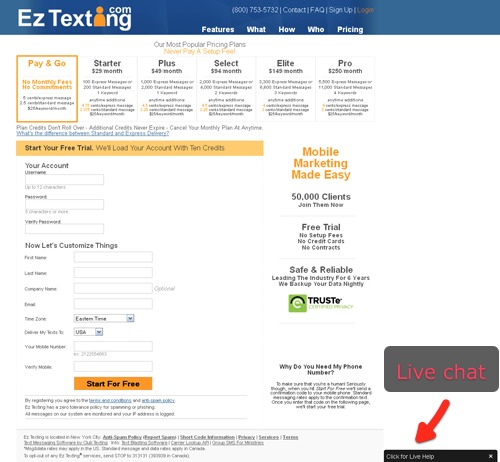
Alternatively to on-site surveys, you can have on-site live chat.

It might look something like this:7For Ez Texting, using Olark’s livechat widget on their pricing page helped to increase signups by 31%.
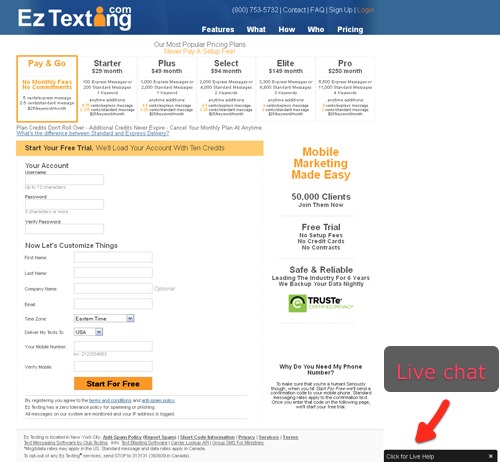
Accounting company CheckMark also saw a 20% increase in new sales within just a few months of implementing live-chat. Imagine how much more that could be if they used that data to improve the copy leading to those chat pages?

One of the advantages of live chat is that visitors really get ALL their questions answered by a real person. If you sell something technical or your offer raises questions than having live chat capability can help to reduce any friction to buying.

Service providers:

Gathering Feedback From Leads

Using the feedback from non-leads is great, but only if you use it to help improve your actual leadflow.

But what happens when you start building feedback loops into your follow-up communications with leads?

How Monthly1k.com Was Started

8

Noah Kagan’s AppSumo had a great new product, How To Make a $1,000 a Month Business. The product had been well received by the initial test group, it was delivering exactly what it promised. Great.

Fast forward to the official launch date.

A highly targeted email campaign launched to 30,000 people.

Product was great, list was highly targeted – so just wait for the money to start rolling in, right?

Only 30 people bought it on the official launch, that’s a conversion rate of just 0.1%. Shit.

The Solution – Ask Using A Survey
9Something clearly wasn’t resonating with the target audience.

The solution wasn’t so much in the action (send a feedback survey) but to whom (segmentation!) the survey was sent.

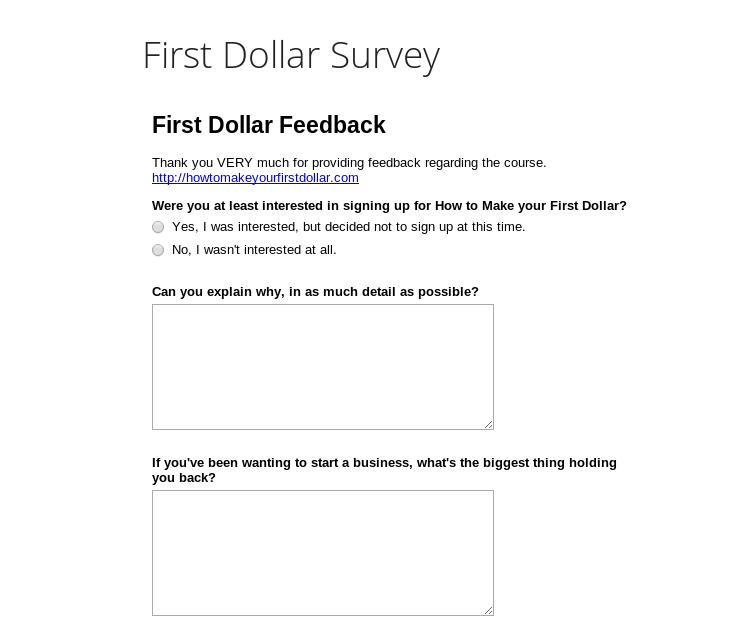
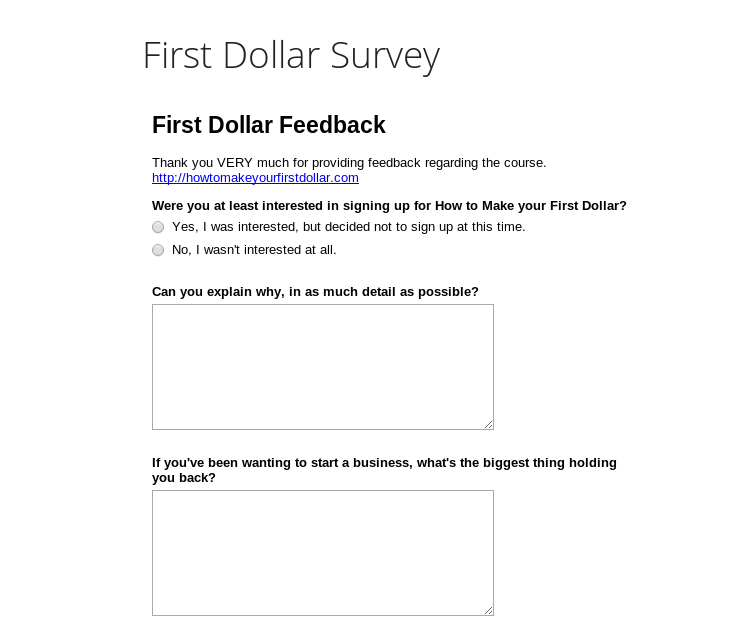
The survey went to people who had opened the email, clicked through buthadn’t bought. The logic was that group of people  showed some interest but in the end didn’t buy.

The survey had 4 simple questions:

  1. Were you at least interested in buying? YES or NO
  2. Be specific about the answer
  3. What’s holding you back from starting your business?
  4. Should we make our support sumo do a dance video?

Responses from anyone that was not interested in buying where deleted immediately (can’t help people who don’t want to be helped).Then, sorted the top reasons of people who wanted to buy but didn’t.

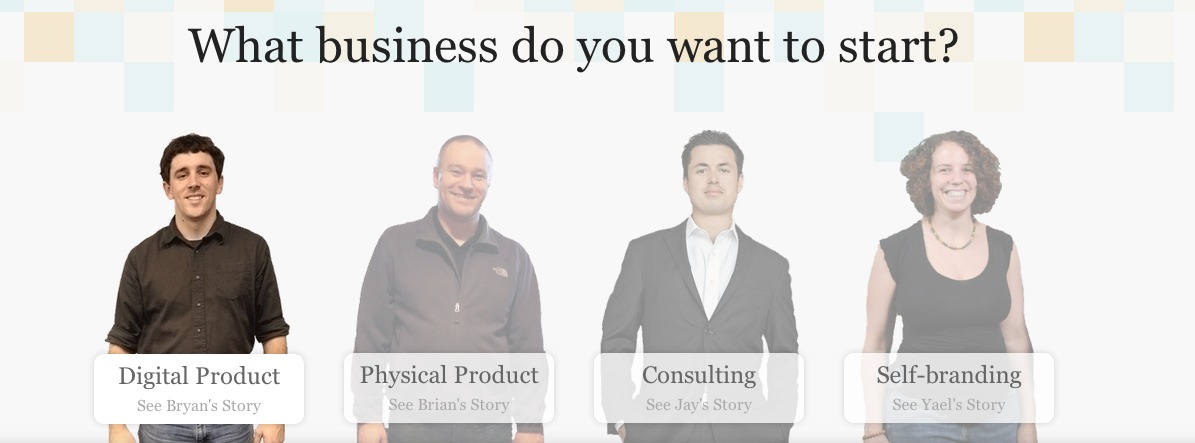
Armed with data, they completely redesigned the landing page using the customer’s language & “business type” to provide answers to most pressing fears and concerns.

10

That one survey literally turned the whole product around and from there on in, it sold a lot better and conversions from email campaigns went up as well.

Read the full story here: http://okdork.com/2013/10/14/how-to-use-surveys-to-get-insane-results/

How MarketResearch.com Asks New Subscribers If They Need Help

MarketResearch.com  Market Research Reports and Industry Analysis

A couple of days ago, Tommy signed up for MarketResearch.com, a company that helps marketers find relevant research and industry reports.

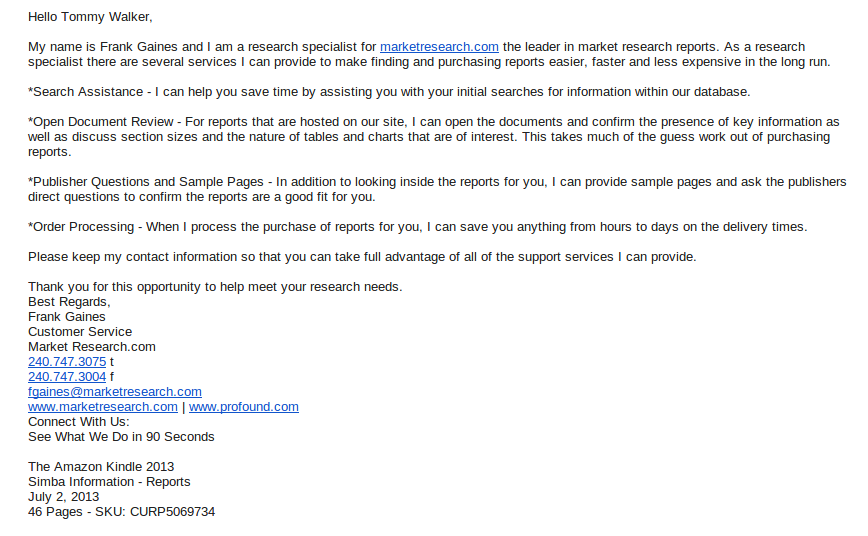
Within 30 minutes upon signing-up he got the following email:11

Realistically MarketResearch.com is probably just using this email to reduce friction for sales.

But notice how they’re also offering search assistance, document reviews & sample data?

The feedback from this email could be used to improve UX and design of the site to get more people self-serving their own needs, freeing up Frank – the research specialist – to do more important things.

Getting Feedback From First Time Customers

First time customers are important when it comes to your survival as a business.

They don’t yet have any experience with you so no matter what happened with previous firsts, this is your chance to start it off right.

And by doing that, it’s far more likely they’ll come back later for more business. To make sure that the initial experience is as good as possible, you need to know how to first time customers perceived their experience so you can get insights into what to change/test next.

How Audi Gathers Feedback From First Time Customers

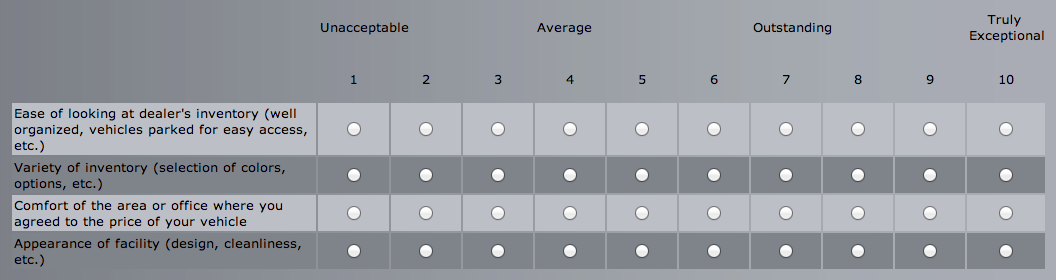
The first two examples are taken from Jason Fried. A few days after purchasing a new car from an Audi dealer, Jason got an email from them asking to rate his experience of buying a new car.

This is what the survey looked like:12image credit
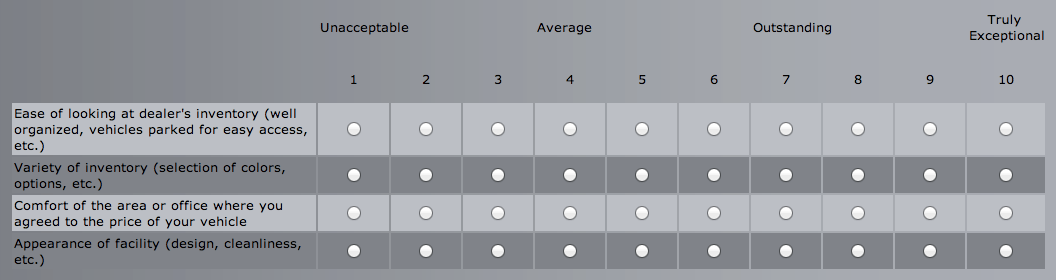
While there’s nothing inherently wrong with a 1-10 rating survey, something that Jason found off-putting was the sensationalized language.

jason fried“Ease of looking at dealer’s inventory” – great, no problems there. A 10, right? Well… was it OUTSTANDING? How about TRULY EXCEPTIONAL?[…] I can’t put my name on that sort of endorsement. So…?”

[…] I find these sorts of things great reminders of how important it is to choose the right words. Don’t overshoot, don’t sensationalize. Be modest with language. Find the right fit and leave it alone.”

With surveys, it’s important to make sure you’re only asking the most relevant questions – if it takes more than a couple minutes to complete, the survey is probably too long.

We know from different studies that the more fields/questions/choices you give to the user, they’ll be that much less likely to take action.

Sadly, Audi doesn’t seem to know that. Instead of just asking simple questions like:  “Were you satisfied with the experience of buying the car? How can we make it even better the next time?” They decided to go the other way and overwhelm the user.

How Zingerman’s Deli Collects Feedback From First Time Customers

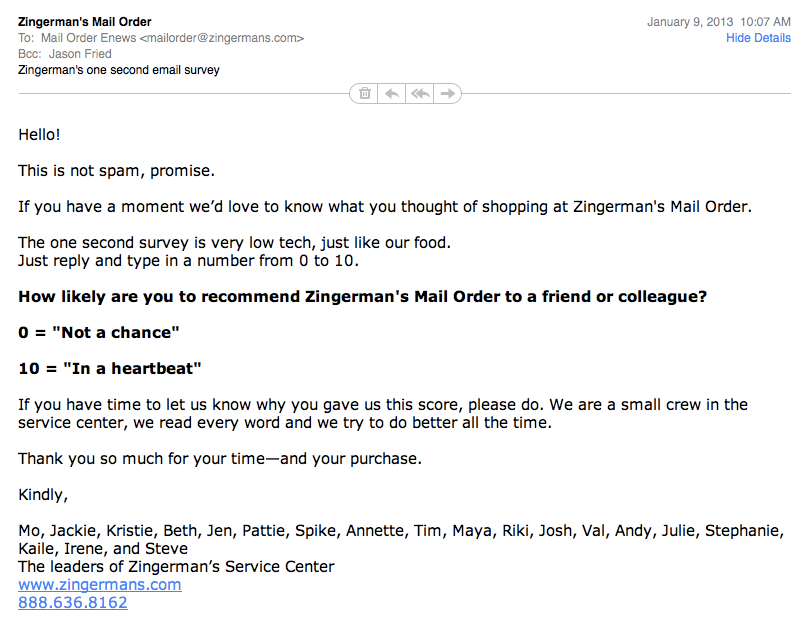
In contrast with Audi, Zingerman’s – an Ann Arbor based mail order deli – wanted to essentially get the same information  – how satisfied the customer was and how can it be made even better?

This is their version of that survey:13image credit
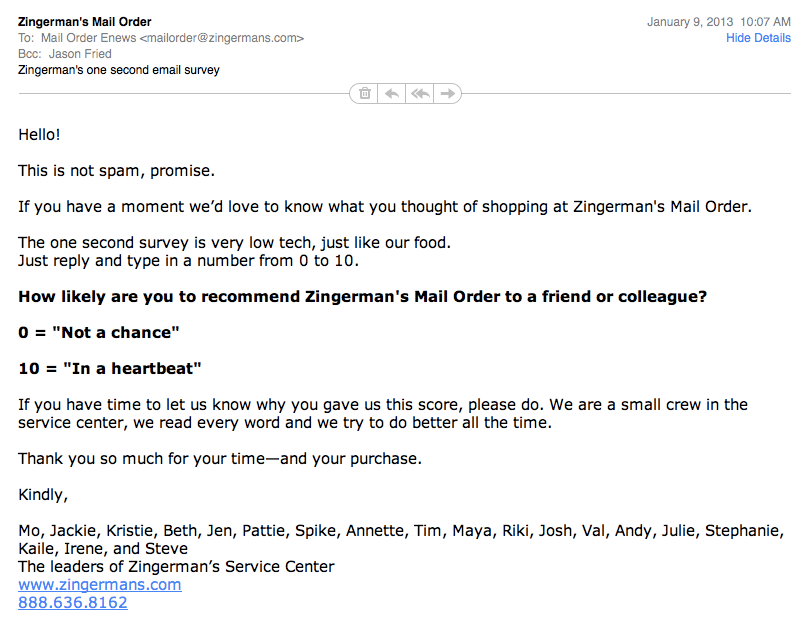
This is a good, short, friendly feedback asking. No need to click anywhere, no long surveys with multiple choice questions. Just one question, right there in the e-mail. It that sense, it’s not really an “survey” at all.

It follows their overall friendly tone of voice and works perfectly.

Even asking for explanation for why the score was given seems logical and it is more than likely that most customers not only gave the score but also explained for why it was was it was.

Sure, there are situations where you need more info than that. But the point is that you have to take the time to craft a valuable customer survey to make it seem like a logical process.

Collecting Reviews & Feedback From Repeat Buyers

Don’t stop with collecting feedback from first time buyers.

There’s a whole segment of customers willing to provide reviews & ratings – sometimes in exchange for a little perk.

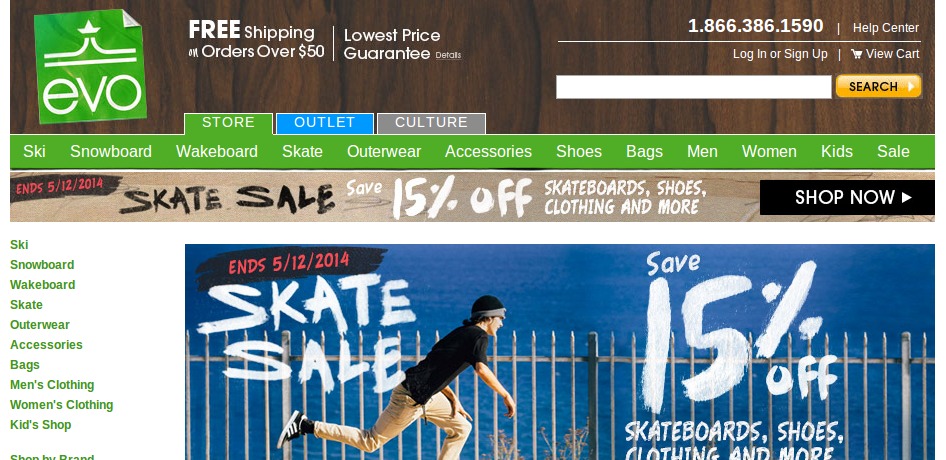
Sports company Evo-Gear, understood the value of reviews and split-tested 3 different approaches in a single email, which gained them 280 reviews on a single product.14

The tactics where:

  1. A simple basic request for a product review
  2. Email suggesting that  a review would help support the community of other customers by giving good shopping advice
  3. Email announcing a contest with a prize valued at $1,000 for a review

In the end, the approach that hinted at community converted around the same as the control,  and the contest approach’s initial conversion rate was 5.6% – roughly double the amount as the control.

If these are the results of a single campaign, imagine what these results might look like were it scaled across all their products?

What kind of contests and/or incentives can you use to boost the number of reviews you’re getting?

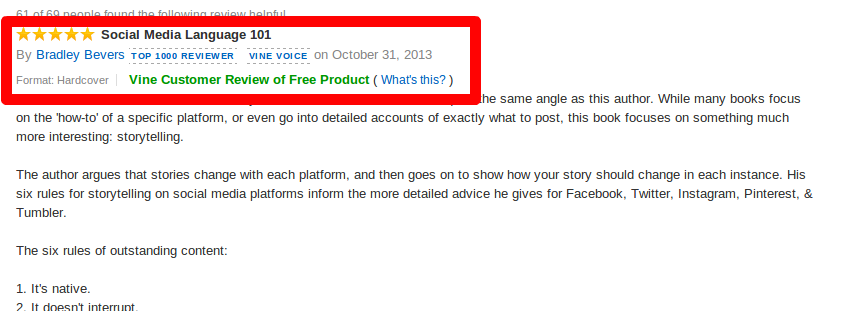
Taking it a step further, Amazon has the Vine Voices program – which hand picks the best reviewers from across the site & sends them new and pre-released products to use and review.15
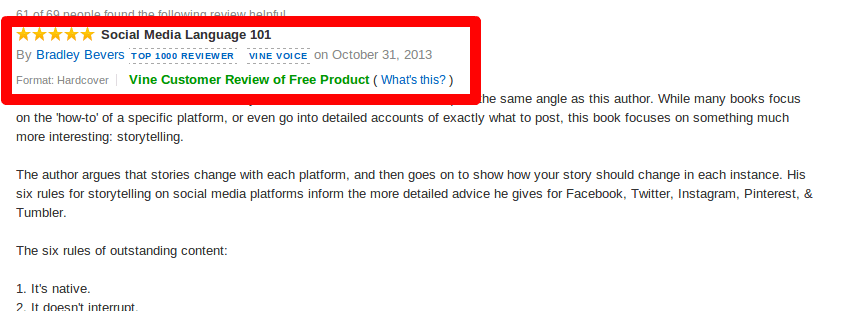
“We invite reviewers to participate in the Vine program based on feedback from other customers. A reviewer’s rank is determined by the overall helpfulness of all their reviews, factoring in the number of reviews they have written.”

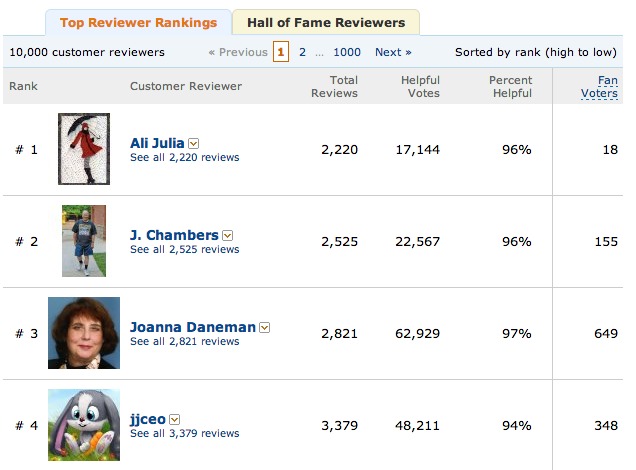
Amazon also makes a game out of reviewing their products, giving a leaderboard for their most helpful reviewers.16

If you have frequent or repeat customers, why not introduce them to each other and make a game out of providing quality feedback?

Building Feedback Into The Product – Kindle’s Mayday Button

Imagine that 50% of your customers are over 50 and 27% of them are over 60.

They love the the idea of owning your product, but often find themselves afraid of using it because the technology is too “new” for them.17

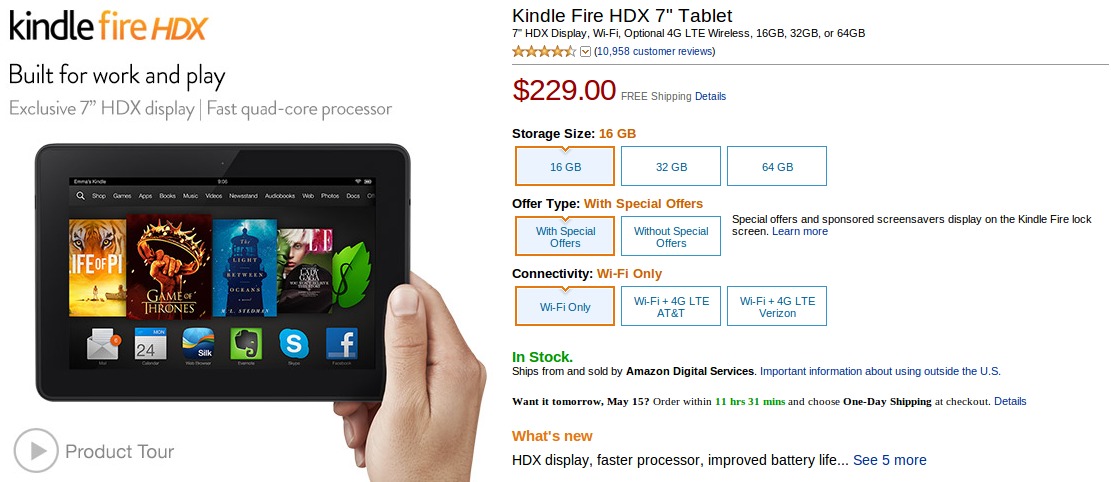
This very may well have been the case in September 2013 when Amazon launched theKindle Fire HDX with a revolutionary new feature – the “Mayday” button. Always available on-device video tech support.

The words Amazon Revolutionizes Customer Support was used a quite a lot, because for the first time ever, customers had real time access to tech help that could see what they saw on their devices and if needed, take total control over the device.

For a traditionally less tech-savvy demographic in the consumer market, this feature makes a lot of sense.

In-App Live Support Is A Feedback Goldmine

18image credit

From an feedback point of view – what Amazon created is about the best example of a feedback loop in action.

On the surface, they have a customer support tool, but in the background, they’ve incorporated usability testing that shows their UX designers where people get “stuck”.

It’s perfect for the user and the company – users get their problems solved and questions answered.

Amazon gets real time feedback on the pain points in the software and/or hardware and use that data to make necessary UX/UI changes.

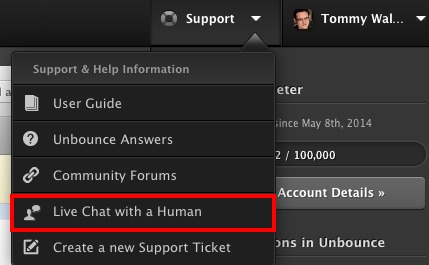
Now, you don’t have to be Amazon to take advantage of this. Using Live Chat solution O-Lark, Unbounce builds live support right into their app that helps them communicate with customers when they need it most.19

Getting Feedback From Non-Converting Customers

What do you do with all those people who sign up for free-trials but don’t convert?

Instead of letting them slip away, build a feedback loop into the end of your email onboarding process to learn why people didn’t convert.

How Vero Collects Feedback on the “Win-Back” Campaign

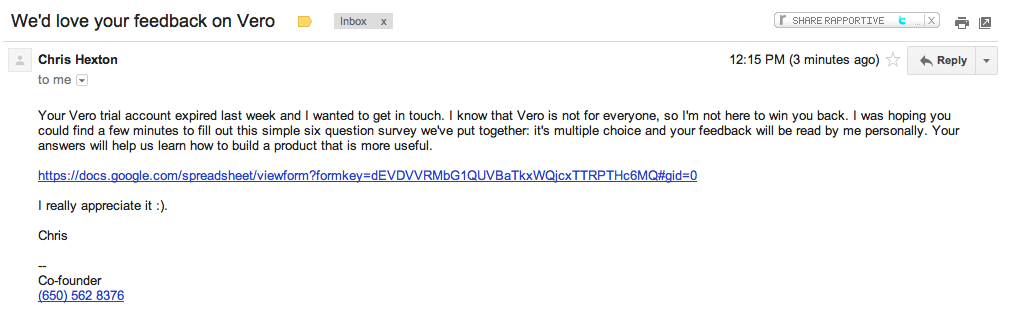
This is exactly what Vero did, they sent a simple, personal email one week after the customers trial has expired. All automated of course.

Looks like this:20image credit
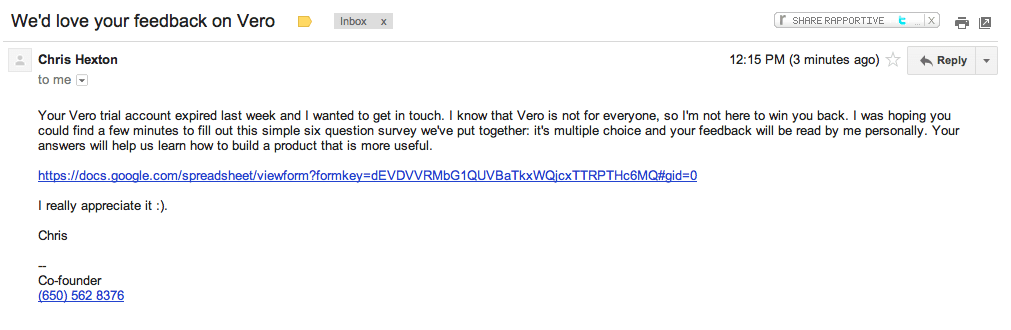
The advantages of this are 2 fold.

First, Vero gets a great amount of information on why people decided not to use them (huge help when making future product decisions).

Second, The number of people who complete this survey is around 2%, and of those around half will end up giving Vero another try.

Those numbers aren’t massive, but then again, getting more people to open the emailand take the survey is something that can be tested & improved upon.

How many other businesses have contacted you for feedback asking why you didn’t continue? Is this something that you can use in your business?

How Listening To Feedback Helped Bring In $21,243 For ClickMinded

SEO Training  Digital Marketing Courses   More   ClickMinded   Learn how search engine optimization fundamentally works.

Tommy Griffith is the face behind ClickMinded, an internet marketing training course focusing on bringing more customers to your site.

When he was just coming out with his product and after some initial success onUdemy with selling his course, he decided to also try and sell it through AppSumo.

The team over at AppSumo agreed that it would be an perfect product for their audience.

Fast-forward to morning of the launch of the product on AppSumo.

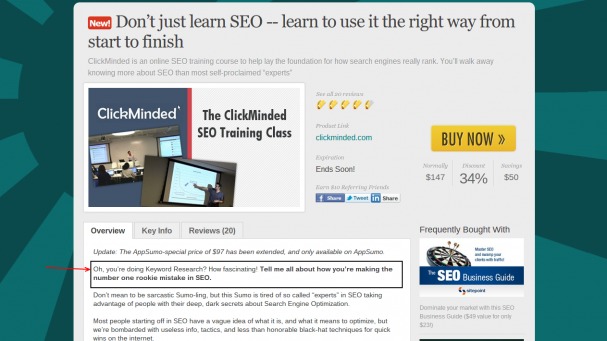
After initial sales, the product had 2.5 / 5 rating after 10 reviews. The very same product had always received at least 4 stars on Yelp and the online class over at Udemy had equally good rating.

Something was not right.21Image Credit

There Was No Discount!

Turned out that every single negative review wasn’t actually complaining about the quality of the course itself, no.

They were complaining about the fact that there was no discount on the product.

That was something that the team had warned Tommy about but at the time he decided to ignore it.

Side-note: 99,99% products featured at AppSumo come with steep discounts.

After dropping the price, refunding everyone had at bought it at the original price and re-sending the offer later in the week, more positive reviews started coming in, and the initial negative reviewers were slowly starting to change their reviews after some additional hand holding.

By the end of the campaign, the rating had gone up from 2.5 to 4.5 and in 8 days managed to bring in total revenue of $21.243. All thanks to asking for feedback, using it and making changes. Not bad.

Read the full story here: http://www.clickminded.com/why-appsumo-is-going-to-keep-crushing-it/

Conclusions

As we have shown, feedback can be used in all kind of different ways.

Be it getting product reviews, as a question and answer tool with on-site feedback, turning around failing products or simply getting back past customers who have tried your product but for whatever reason did not go forward with using it after the trial ended.

Building feedback loops into your products is good for everyone: for customers it shows that the company actually cares about it’s products, services and the people using it.

For companies it’s a great tool to use in your in understanding how people are using your products, what they like about it, don’t like about. Later take that data and change things around for even more success.

Are you using feedback loops in your company already? If not yet, how are you planning on implementing them?

Google Search Will Be Your Next Brain

By Steven Levy and first posted on medium.com.


For the “Cliff Notes” version, check out this video by Rand Fishkin from MOZ.com.

http://fast.wistia.net/embed/iframe/umzlagism3


“I need to know a bit about your background,” says Geoffrey Hinton. “Did you get a science degree?”

Hinton, a sinewy, dry-witted Englishman by way of Canada, is standing at a white board in Mountain View, California, on the campus of Google, the company he joined in 2013 as a Distinguished Researcher. Hinton is perhaps the world’s premier expert on neural network systems, an artificial intelligence technique that he helped pioneer in the mid 1980s. (He once remarked he’s been thinking about neural nets since he was sixteen.) For much of the period since then, neural nets — which roughly simulate the way the human brain does its learning— have been described as a promising means for computers to master difficult things like vision and natural language. After years of waiting for this revolution to arrive, people began to wonder whether the promises would ever be kept.

Geoff Hinton. Photo: Michelle Siu/Backchannel

But about ten years ago, in Hinton’s lab at the University of Toronto, he and some other researchers made a breakthrough that suddenly made neural nets the hottest thing in AI. Not only Google but other companies such as Facebook, Microsoft and IBM began frantically pursuing the relatively minuscule number of computer scientists versed in the black art of organizing several layers of artificial neurons so that the entire system could be trained, or even train itself, to divine coherence from random inputs, much in a way that a newborn learns to organize the data pouring into his or her virgin senses. With this newly effective process, dubbed Deep Learning, some of the long-standing logjams of computation (like being able to see, hear, and be unbeatable at Breakout) would finally be untangled. The age of intelligent computers systems — long awaited and long feared — would suddenly be breathing down our necks. And Google search would work a whole lot better.

This breakthrough will be crucial in Google Search’s next big step: understanding the real world to make a huge leap in accurately giving users the answers to their questions as well as spontaneously surfacing information to satisfy their needs. To keep search vital, Google must get even smarter.

Here’s Dr. Hinton’s explanation for English majors. Photo: Steven Levy

This is very much in character for the Internet giant. From its earliest days, the company’s founders have been explicit that Google is an artificial intelligence company. It uses its AI not just in search — though its search engine is positively drenched with artificial intelligence techniques — but in its advertising systems, its self-driving cars, and its plans to put nanoparticles in the human bloodstream for early disease detection. As Larry Page told me in 2002:

We don’t always produce what people want. That’s what we work on really hard. It’s really difficult. To do that you have to be smart, you have to understand everything in the world, you have to understand the query. What we’re trying to do is artificial intelligence…the ultimate search engine would be smart. And so we work to get closer and closer to that.

Google was already well along that path when Geoff Hinton made his breakthrough. Over the years, the company has been a leader in using a more traditional form of what is called machine learning to make its search engine smarter. Only a few years into the company’s history, it hired a group of AI-savvy engineers and scientists who jiggered the search engine to learn things like synonyms. When millions of users used a certain word interchangeably with another (dog or puppy, for instance), Google would quickly utilize that knowledge to understand queries better. And when Google took on the task of translating web sites to deliver results from sites in different languages, its scientists made use of a process that fed massive amounts of translated documents and their sources into the system. That way, Google’s search engine “learned” how one language mapped to another. Using that AI procedure, Google could translate web sites into languages not spoken by any of its engineers.

Deep learning is now viewed as a step beyond that more straightforward variety of machine learning. Since it is based on the architecture of the human brain, its adherents argue that, in theory, deep learning is the launch pad for computer-based feats of intelligence not possible — at least not easily—with previous approaches. That’s why Hinton’s breakthrough is so important to Google, as well as every other company dealing in search and related problems. Google has worked hard in the past few years to reshape its search engine to generate a conversational experience. But to truly attain the skills of even a very young human being, the frontiers of AI must be expanded, and Deep Learning is the tool du jour for accomplishing this.

Explaining the circumstances by which neural nets earned the sobriquet Deep Learning isn’t easy. But Hinton is game to try, though I felt I detected a hopeless sigh when he learned he was addressing an English major.

Neural nets are modeled on the way biological brains learn. When you attempt a new task, a certain set of neurons will fire. You observe the results, and in subsequent trials your brain uses feedback to adjust which neurons get activated. Over time, the connections between some pairs of neurons grow stronger and other links weaken, laying the foundation of a memory.

A neural net essentially replicates this process in code. But instead of duplicating the dazzlingly complex tangle of neurons in a human brain, a neural net, which is much smaller, has its neurons organized neatly into layers. In the first layer (or first few layers) are feature detectors, a computational version of the human senses. When a computer feeds input into a neural net—say, a database of images, sounds or text files—the system learns what those files are by detecting the presence or absence of what it determines as key features in them. For example, if the task was to characterize emails as either spam or legitimate messages, neural net researchers might feed the system many messages, along with the label of either SPAM or NOT_SPAM. The network would automatically intuit complex features of words (“Nigerian prince,” “Viagra”), patterns of words, and information in the message header that would be useful in determining whether a message should be labeled spam or not.

In early neural net experiments, computers were unable to design features by themselves, so features had to be designed by hand. Hinton’s original contribution was helping establish a technique called “back propagation,” a form of feedback that allowed the system to more efficiently learn from its mistakes and assign its own features.

“Back in 1986, when we first developed back propagation, we were excited by the fact you could learn multiple layers of feature detectors, and we thought we solved the problem,” says Hinton. “And it was very disappointing that we didn’t make huge breakthroughs in practical problems. We were completely wrong in our guess about how much computation was needed and how many labeled examples were needed.”

But even though many researchers had lost faith in neural nets over the years, Hinton felt strongly that they would eventually be practical. In 1995, he and his students tried losing the labels, at least in the earlier parts of the learning process. This technique was called “unsupervised pre-training.” meaning that the system figures out how to organize input on its own. But Hinton says that the real key to making this work was a mathematical trick, an approximation that saved computation time as the information moved through the layers of neurons — this allowed for many more iterations to refine the network. As often happens, speed becomes transformative, in this case making it possible to perform learning that previous neural nets couldn’t attempt. It was as if a person could suddenly cram in, say, the equivalent of five hours of skiing practice in ten minutes.

With unsupervised learning, only in the latter stages would the system’s human masters intervene, by labeling the more desirable outputs and rewarding successful outcomes. “Think about little kids, when they learn to recognize cows,” says Hinton. “It’s not like they had a million different images and their mothers are labeling the cows. They just learn what cows are by looking around, and eventually they say, ‘What’s that?’ and their mother says, ‘That’s a cow’ and then they’ve got it. This works much more like that.” (Later, researchers would master an effective alternative to unsupervised learning that relied on better initializing techniques and the use of larger datasets.)

When Hinton’s group tested this model, it had the benefit of something unavailable at the time neural nets were first conceived — super fast GPUs (Graphic Processing Units). Though those chips were designed to churn out the formulae for advanced graphics, they were also ideal for the calculations required in neural nets. Hinton bought a bunch of GPUs for his lab and got two students to operate the system. They ran a test to see if they could get the neural network to recognize phonemes in speech. This, of course, was a task that many technology companies — certainly including Google — had been trying to master. Since speech was going to be the input in the coming age of mobile, computers simply had to learn to listen better

Geoff Hinton. Photo: Michelle Siu/Backchannel

How did it do?

“They got dramatic results,” says Hinton. “Their very first results were about as good as the state of the art that had been fine-tuned for 30 years, and it was clear that if we could get results that good on the first serious try, we were going to end up getting much better results.” Over the next few years, the Hinton team made additional serious tries. By the time they published their results, the system, says Hinton, had matched the best performance of the existing commercial models. “The point is, this was done by two students in a lab,” he says.

Deep Learning was born.

In 2007, in the midst of this work, Hinton gave a Google Tech Talk in Mountain View about Deep Learning, which galvanized the geeks in attendance, and won a huge following on YouTube. It helped spread the news that neural nets were finally going to be a powerful tool. And the rush was on to hire people who understood this new technique. Hinton’s students went to IBM, Microsoft, and, of course, Google. That represented three of the four major companies working in the field (the other one, Nuance, includes Apple among its suppliers). All were free to use the work from Hinton’s lab in the systems each would help refine in his respective company. “We basically gave it away because we were very concerned to prove we had the goods,” says Hinton. “What was interesting was that MSR [Microsoft Research] and IBM got it before Google but Google turned it into a product faster than anyone else.”

Hinton’s arrival at Google was only one of a series of huge hires in that season. Only a few months earlier, Ray Kurzweil, the Panglossian philosopher of AI, joined a team that already included AI legends like Peter Norvig (who wrote the standard textbook for AI courses), and Sebastian Thrun (a key inventor of the self-driving car).

But now the company was intoxicated by deep learning, apparently convinced that it would produce the big breakthroughs in the next generation of search. Already the advent of mobile computing had forced the company to change the very character of its search engine. To go farther, it had to know the world in the same sense that a human would know the world — but also of course perform the superhuman task of knowing everything in the world and being able to find it in less than half a second.

So it was probably only a matter of time before Jeff Dean would get involved in this.

Dean is a Google legend. He was already well known in computer science circles when he came to Google in 1999, and hiring him was a milestone for what was a relatively obscure Internet company with a double-figure headcount. In the intervening years, Dean became a leader in creating Google’s software infrastructure. In the process, a geek underground of Dean fans emerged, creating a comical meme about the engineer’s prowess called “Jeff Dean Facts.” Most of them reference super-geeky coding arcana, but some of the more intelligible ones are

  • Jeff Dean can beat you at connect four. In three moves.
  • One day Jeff Dean grabbed his Etch-a-Sketch instead of his laptop on his way out the door. On his way back home to get his real laptop, he programmed the Etch-a-Sketch to play Tetris.
  • Jeff Dean is still waiting for mathematicians to discover the joke he hid in the digits of Pi.

Dean, now 46, had long known about neural nets — his undergraduate thesis project made use of them. In the intervening years, though, he had come to the conclusion of most of his peers that they were not ready for prime time. “There was a lot of promise back then but they faded away for a while because we didn’t have enough computational power to make them sing,” he says, stretching his lanky frame in a Googleplex conference room last fall. In 2011, though, Dean ran into Andrew Ng in one of Google’s many snack pantries. Ng was a Stanford AI professor — one of the giants in the field— who’d been spending a day a week at the search company. When Dean asked Ng what he was up to, he was surprised at the answer: “We’re trying to train neural nets.” Ng told Dean that things had changed — after the deep learning breakthrough, they worked pretty well, and if Google could figure out how to train really big nets, amazing things would happen.

Jeff Dean. Photo: Talia Herman/Backchannel

Dean thought this sounded like fun, and began “dabbling with it” for about six months, and then became convinced that a project to build a massive neural net system could very quickly bring concrete results. So he and Ng made it a full time project. (Ng has since left Google, and has recently joined Baidu — to develop the Chinese search leader’s own AI projects.)

For about a year, the project was known informally as “The Google Brain” and based within Google X, the company’s long-range, high-ambition research department. “It’s a kind of joking internal name, but we tried not to use it externally because it sounds a little strange,” says Dean. In 2012, results began to accrue, the team moved out of the purely experimental Google X division and situated itself in the search organization. It also began to avoid using the term “brain.” The preferred term for outsiders is “Google’s Deep Learning Project,” which does not have the same ring but is less likely to incite pitchfork gatherings at the gates of the Googleplex.

Dean says that the team started by experimenting with unsupervised learning, because “we have way more unsupervised data in the world than supervised data.” That resulted in the first publication from Dean’s team, an experiment where the Google Brain (spread over 16,000 microprocessors, creating a neural net of a billion connections) was exposed to 10 million YouTube images in an attempt to see if the system could learn to identify what it saw. Not surprisingly, given YouTube content, the system figured out on its own what a cat was, and got pretty good at doing what a lot of users did — finding videos with feline stars. “We never told it during training, ‘This is a cat,’” Dean told the New York Times. “It basically invented the concept of a cat.”

And that was just a test to see what the system could do. Very quickly, the Deep Learning Project built a mightier neural net and began taking on tasks like speech recognition. “We have a nice portfolio of research projects, some of which are short and medium term — fairly well understood things that can really help products soon — and some of which are long term objectives. Things for which we don’t have a particular product in mind, but we know would be incredibly useful.”

One example of this appeared not long after I spoke to Dean, when four Google deep learning scientists published a paper entitled “Show and Tell.” It not only marked a scientific breakthrough but produced a direct application to Google search. The paper introduced a “neural image caption generator” (NIC) designed to provide captions for images without any human invention. Basically, the system was acting as if it were a photo editor at a newspaper. It was a humongous experiment involving vision and language. What made this system unusual is that it layered a learning system for visual images onto a neural net capable of generating sentences in natural language.

Here’s how the Neural Image Caption Generator described these images: “A group of young people playing Frisbee,” “A person riding a motorcycle on a dirt road,” and “A herd of elephants walking across a dry grass field.”

Nobody is saying that this system has exceeded the human ability to classify photos; indeed, if a human hired to write captions performed at the level of this neural net, the newbie wouldn’t last until lunchtime. But it did shockingly, shockingly well for a machine. Some of the dead-on hits included “a group of young people playing a game of frisbee,” “a person riding a motorcycle on a dirt road,” and “a herd of elephants walking across a dry grass field.” Considering that the system “learned” on its own concepts like a Frisbee, road, and herd of elephants, that’s pretty impressive. So we can forgive the system when it mistakes a X-games bike rider for a skateboarder, or misidentifies a canary yellow sports car for a school bus. It’s only the first stirrings of a system that knows the world.

And that’s only the beginning for the Google Brain. Dean isn’t prepared to say that Google has the world’s biggest neural net system, but he concedes, “It’s the biggest of the ones I know about.”

While Hinton’s hiring and Dean’s brain were major steps in pushing the company towards deep learning, perhaps the biggest move yet occurred in 2013, when Google spent $400 million to acquire DeepMind, a London-based artificial intelligence company. DeepMind has its own take on deep learning, based on a closer study of the brain itself. To make the purchase, Google aced out its key competitors, who also had designs on the company. And for good reason: DeepMind may well turn out to be as big a bargain as the $1.7 billion Google paid for YouTube or the mere $50 million for a fledging open-source mobile operating system called Android.

The CEO and co-founder is Demis Hassabis. A compact, dark-haired man of 38, Hassabis speaks quickly, as if he were a podcast played at double speed. “My whole career has been leading up to the AI company,” he says, taking a break in the company’s vertically sprawling new headquarters in central London, near the St Pancras train station. DeepMind recently moved here from a small office building in Bloomsbury. It’s an unusual setup where a new structure was merged with an existing wing of the old hospital, causing a sort of time-travel whiplash. The conference rooms are named after philosophers, writers and artists associated with vast intellectual leaps, like DaVinci, Gödel and Shelly (ominously, Mary, not Percy). The team has recently grown to take on two Oxford University-based companies that DeepMind (and of course its parent Google) acquired. One is Dark Blue Labs, which uses deep learning for natural language understanding; the other, Vision Factory, uses the technique for object recognition.

At 14, Hassabis was an avid computer game programmer as well as a chess prodigy. Working under the mentorship of game wizard Peter Molyneux, he had key roles in landmark titles such as Black and White and Theme Park.Then he started his own game company, eventually employing 60 people, while still in his twenties. But gaming, he says, was a means to an end, the end being the development of an intelligent general purpose artificial intelligence machine. By 2004, he felt that he had taken gaming AI as far as he could in that field. But it was too soon to start an AI company — the computer power he needed wasn’t cheap and plentiful enough. So he studied for a doctorate in cognitive neuroscience at the University College London.

In 2007, he co-authored an article on the neural basis of memory that the journal Science named one of the year’s ten biggest breakthroughs. He became a fellow at the Gatsby Computational Neuroscience Unit and also was affiliated with UCL, MIT and Harvard. In 2010, though, he decided it was finally time to form a company to do advanced AI, and he co-founded it with Gatsby colleague Shane Legg and Mustafa Suleyman, a serial entrepreneur who dropped out of Oxford at 19. Funders included Peter Theil’s Founders Fund and Elon Musk (who later expressed concerns about the downside of AI). Geoffrey Hinton was one of its advisors.

DeepMind operated in stealth, with only one result released publicly before the Google purchase. It was enough to cause a frenzy of speculation with a dash of uneducated derision. The paper described DeepMind’s success atpassively training a neural net to play vintage Atari computer games. The neural-net system was left to its own deep learning devices to learn game rules — the system simply tried its hand at millions of sessions of Pong, Space Invaders, Beam Rider and other classics, and taught itself to do equal or surpass an accomplished adolescent. (Take notice, Twitch!) Even more intriguing, some of its more successful strategies were ones that no humans had ever envisioned. “This is a particular potential of this type of technology,” says Hassabis. “We’re imbuing it with the ability to learn for itself from experience just like a human would do and therefore it can master things that maybe we don’t know how to program. It’s exciting to see that when it comes up with a new strategy in an Atari game that the programmers didn’t know about.”

It’s a small step towards Hassabis’s big goal of a brain that will not only know a lot of facts, but it will know what to do next. DeepMind is not satisfied to build only an engine for limited domains, like Atari games, commuting, or handling appointments. It wants to create a general artificial intelligence machine that will process information anywhere it can get it, and then do pretty much everything. “The general AI that we work on here is a process that automatically converts unstructured information into useful, actionable knowledge,” he says. “We have a prototype of this — the human brain. We can tie our shoelaces, we can ride cycles and we can do physics with the same architecture. So we know this is possible and then the idea for our research program is to slowly widen and widen those domains.”

Does it sound scary to you that Hassabis is envisioning a giant artificial brain that sucks up the world’s information, structures it into a form it understands, and then takes action? Well, it’s kind of scary to Hassabis, too. At least to the point where he acknowledges that the advanced techniques his own group is pioneering may lead to a problem where AI gets out of human control, or at least becomes so powerful that its uses might best be constrained. (Hassabis’ DeepMind co-founder Shane Legg is even more emphatic: he considers a human extinction due to artificial intelligence the top threat in this century. And DeepMind investor Elon Musk has just dropped $10 million to study AI dangers.) That’s why, as a condition of the DeepMind purchase, Hassabis and his co-founders demanded that Google set up an outside board of advisors to monitor the progress of the company’s AI efforts. DeepMind had already decided that it would never license its technology to the military or spy agencies, and it got Google to agree to that as well.

Less comforting is that Hassabis won’t reveal the makeup of that board, except to say that it consists of “top professors in computation, neuroscience and machine learning.” Since DeepMind’s work is still in the early stages — no Singularities in sight as of yet — he assures us there’s no need to make the committee members public. “There’s no issues here currently but in the next five or ten years maybe there will be,” he says. “So really it’s just getting ahead of the game.”

But the game is moving fast. Last fall, DeepMind published another major paper, describing a project that synthesizes some ideas from neuroscience memory techniques to create a neural network with the properties of a Turing Machine, which is synonymous for a universal computing device. This means that such a system, given enough time and memory, can in theory compute anything. The paper focused on the practical: with the ability to “record” information and draw on it later—kind of an artificial version of a person’s “working memory”—the Neural Turing Machine was not only able to learn faster and to perform more complex tasks than previous neural nets, but “to generalise well outside its training regime,” write the DeepMind authors. One can’t help but feel that it’s a significant step taken towards that general purpose AI engine that Hassabis dreams about.

Indeed, as of now, all Google’s deep learning work has yet to make a big mark on Google search or other products. But that’s about to change.

Since Jeff Dean’s deep learning project has moved from Google X to the Knowledge division (which includes search), his team has been working closely with a number of search-related teams, including language and image recognition. The Google Brain has become sort of an AI utility in the company. “It’s like an internal service,” says Dean. “If people in our group are really interested in a particular problem, we’ll find the right outlets for something if we’re able to do something good.” Dean says that around 35 to 40 groups are using it at Google now. Besides search and speech, he says, “We have stuff in ads, street view, and some stuff in the self-driving cars.”

Jeff Dean. Photo: Talia Herman/Backchannel

As for longer-range projects, Dean talks of an attempt to do a better form of real-time translation. That’s a high bar these days — besides Google’s own current, well-regarded system, Microsoft’s Skype has impressed observers with instant voice translation. But Dean is excited about his own team’s effort to push things forward. “This is a model that uses only neural nets to do end-to-end language translation,” he says. “You train on pairs of sentences in one language or another that mean the same thing. French to English say. You feed in English sentences one word at a time, boom, boom, boom… and then you feed in a special ‘end of English’ token. All of a sudden, the model starts spitting out French.”

Dean shows a head-to-head comparison between the neural model and Google’s current system — and his deep learning newcomer one is superior in picking up nuances in diction that are key to conveying meaning. “I think it’s indicative that if we scale this up, it’s going to do pretty powerful things,” says Dean.

DeepMind is also ready for production. Hassabis says within six months or so, its technology will find their way into Google products. His organization is broken up into divisions, and one — headed by his co-founder Mustafa Suleyman—is devoted to applied uses of the AI, working closely with Google to see what might be of use.

Hassabis has some ideas how DeepMind tech might enhance people’s lives. He believes that a more proactive version of search — not only finding things for people but making decisions for them — would be a valuable provider of the most precious commodity imaginable — time. “There’s more books in the world that I would find fascinating than I could possibly read in my lifetime,” says Hassabis. “So why is it that any time I’m on a long haul flight or on a rare holiday somewhere that I might be thinking what book should I read? That should never happen. I think a lot of those things will be better automated.”

Down the road, Hassabis envisions DeepMind’s work finding its way into more exotic Google projects like the self-driving car, and even Calico, a spinoff company devoted to extending human lifespan.

It is ultimately significant that DeepMind and Google Brain — along with Hinton’s deep learning group — are all in Google’s search organization. Many years ago, Larry Page and Sergey Brin spoke, maybe only half jokingly, of search being an implant in our brains. No one talks about implants now. Instead of tapping our brains to make search better, Google is building brains of its own.

15 SEO Best Practices for Structuring URLs

By Rand Fishkin and originally posted on The Moz Blog

It’s been a long time since we covered one of the most fundamental building blocks of SEO—the structure of domain names and URLs—and I think it’s high time to revisit. But, an important caveat before we begin: the optimal structures and practices I’ll be describing in the tips below are NOT absolutely critical on any/every page you create. This list should serve as an “it would be great if we could,” not an “if we don’t do things this way, the search engines will never rank us well.” Google and Bing have come a long way and can handle a lot of technical challenges, but as always in SEO, the easier we make things for them (and for users), the better the results tend to be.

#1: Whenever possible, use a single domain & subdomain

It’s hard to argue this given the preponderance of evidence and examples of folks moving their content from a subdomain to subfolder and seeing improved results (or, worse, moving content to a subdomain and losing traffic). Whatever heuristics the engines use to judge whether content should inherit the ranking ability of its parent domain seem to have trouble consistently passing to subdomains.

That’s not to say it can’t work, and if a subdomain is the only way you can set up a blog or produce the content you need, then it’s better than nothing. But your blog is far more likely to perform well in the rankings and to help the rest of your site’s content perform well if it’s all together on one sub and root domain.

subdomain vs. subfolders

For more details and plenty of examples (in the post and comments), check out  this recent Whiteboard Friday on the topic.

#2: The more readable by human beings, the better

It should come as no surprise that the easier a URL is to read for humans, the better it is for search engines. Accessibility has always been a part of SEO, but never more so than today, when engines can leverage advanced user and usage data signals to determine what people are engaging with vs. not.

Readability can be a subjective topic, but hopefully this illustration can help:

scale of url readability

The requirement isn’t that every aspect of the URL must be absolutely clean and perfect, but that at least it can be easily understood and, hopefully, compelling to those seeking its content.

#3: Keywords in URLs: still a good thing 

It’s still the case that using the keywords you’re targeting for rankings in your URLs is a solid idea. This is true for several reasons.

First, keywords in the URL help indicate to those who see your URL on social media, in an email, or as they hover on a link to click that they’re getting what they want and expect, as shown in the Metafilter example below (note how hovering on the link shows the URL in the bottom-left-hand corner):

keywords in urls

Second, URLs get copied and pasted regularly, and when there’s no anchor text used in a link, the URL itself serves as that anchor text (which is still a powerful input for rankings), e.g.:

url as anchor text

Third, and finally, keywords in the URL show up in search results, and  research has shown that the URL is one of the most prominent elements searchers consider when selecting which site to click.

urls in serps

#4: Multiple URLs serving the same content? Canonicalize ’em!

If you have two URLs that serve very similar content, consider canonicalizing them, using either a 301 redirect (if there’s no real reason to maintain the duplicate) or a rel=canonical (if you want to maintain slightly different versions for some visitors, e.g. a printer-friendly page).

Duplicate content isn’t really a search engine penalty (at least, not until/unless you start duplicating at very large scales), but it can cause a split of ranking signals that can harm your search traffic potential. If Page A has some quantity of ranking ability and its duplicate, Page A2, has a similar quantity of ranking ability, by canonicalizing them, Page A can have a better chance to rank and earn visits.

#5: Exclude dynamic parameters when possible

This kind of junk is ugly:

dynamic parameters in urls

If you can avoid using URL parameters, do so. If you have more than two URL parameters, it’s probably worth making a serious investment to rewrite them as static, readable, text.

Most CMS platforms have become savvy to this over the years, but a few laggards remain. Check out tools like mod_rewrite and ISAPI rewrite (for IIS) to help with this process.

Some dynamic parameters are used for tracking clicks (like those inserted by popular social sharing apps such as Buffer). In general, these don’t cause a huge problem, but they may make for somewhat unsightly and awkwardly long URLs. Use your own judgement around whether the tracking parameter benefits outweigh the negatives.

vanity domain urls click volume

Research from a  2014 RadiumOne study suggests that social sharing (which has positive, but usually indirect impacts on SEO) with shorter URLs that clearly communicate the site and content perform better than non-branded shorteners or long, unclear URL strings.

#6: Shorter > longer

Shorter URLs are, generally speaking, preferable. You don’t need to take this to the extreme, and if your URL is already less than 50-60 characters, don’t worry about it at all. But if you have URLs pushing 100+ characters, there’s probably an opportunity to rewrite them and gain value.

This isn’t a direct problem with Google or Bing—the search engines can process long URLs without much trouble. The issue, instead, lies with usability and user experience. Shorter URLs are easier to parse, to copy and paste, to share on social media, and to embed, and while these might all add up to only a fractional improvement in sharing or amplification, every tweet, like, share, pin, email, and link matters (either directly or, often, indirectly).

#7: Match URLs to titles most of the time (when it makes sense)

This doesn’t mean that if the title of your piece is “My Favorite 7 Bottles of Islay Whisky (and how one of them cost me my entire Lego collection)” that your URL has to be a perfect match. Something like

randswhisky.com/my-favorite-7-islay-whiskies

would be just fine. So, too would

randswhisky.com/blog/favorite-7-bottles-islay-whisky

or variations on these. The matching accomplishes a mostly human-centric goal, i.e. to imbue an excellent sense of what the web user will find on the page through the URL and then to deliver on that expectation with the headline/title.

It’s for this same reason that we strongly recommend keeping the page title (which engines display prominently on their search results pages) and the visible headline on the page a close match as well—one creates an expectation, and the other delivers on it.

clear vs unclear url on facebook

For example, above, you’ll see two URLs I shared on Facebook. In the first, it’s wholly unclear what you might find on the page. It’s in the news section the BBC’s website, but beyond that, there’s no way to know what you might find there. In the second, however, Pacific Standard magazine has made it easy for the URL to give insight into the article’s content, and then the title of the piece delivers:

We should aim for a similar level of clarity in our own URLs and titles.

#8: Including stop words isn’t necessary

If your title/headline includes stop  words (and, or, but, of, the, a, etc.), it’s not critical to put them in the URL. You don’t have to leave them out, either, but it can sometimes help to make a URL shorter and more readable in some sharing contexts. Use your best judgement on whether to include or not based on the readability vs. length.

You can see in the URL of this particular post you’re now reading, for example, that I’ve chosen to leave in “for” because I think it’s easier to read with the stop word than without, and it doesn’t extend the URL length too far.

#9: Remove/control for unwieldy punctuation characters

There are a number of text characters that become nasty bits of hard-to-read cruft when inserted in the URL string. In general, it’s a best practice to remove or control for these. There’s a great  list of safe vs. unsafe characters available on Perishable Press:

safe vs unsafe characters in urls

It’s not merely the poor readability these characters might cause, but also the potential for breaking certain browsers, crawlers, or proper parsing.

#10: Limit redirection hops to two or fewer

If a user or crawler requests URL A, which redirects to URL B. That’s cool. It’s even OK if URL B then redirects to URL C (not great—it would be more ideal to point URL A directly to URL C, but not terrible). However, if the URL redirect string continues past two hops, you could get into trouble.

Generally speaking, search engines will follow these longer redirect jumps, but they’ve recommended against the practice in the past, and for less “important” URLs (in their eyes), they may not follow or count the ranking signals of the redirecting URLs as completely.

The bigger trouble is browsers and users, who are both slowed down and sometimes even stymied (mobile browsers in particular can occasionally struggle with this) by longer redirect strings. Keep redirects to a minimum and you’ll set yourself up for less problems.

#11: Fewer folders is generally better

Take a URL like this:

randswhisky.com/scotch/lagavulin/15yr/distillers-edition/pedro-ximenez-cask/750ml

And consider, instead, structuring it like this:

randswhisky.com/scotch/lagavulin-distillers-edition-750ml

It’s not that the slashes (aka folders) will necessarily harm performance, but it can create a perception of site depth for both engines and users, as well as making edits to the URL string considerably more complex (at least, in most CMS’ protocols).

There’s no hard and fast requirement—this is another one where it’s important to use your best judgement.

#12: Avoid hashes in URLs unless absolutely essential

The hash (or URL fragment identifier) has historically been a way to send a visitor to a specific location on a given page (e.g. Moz’s blog posts use the hash to navigate you to a particular comment, like  this one from my wife). Using URL hashes for something other than this, such as showing unique content than what’s available on the page or wholly separate pages is generally a bad idea.

There are exceptions, like those Google enables for developers seeking to use the hashbang format for dynamic AJAX applications, but even these aren’t nearly as clean, visitor-friendly, or simple from an SEO perspective as statically rewritten URLs. Sites from Amazon to Twitter have found tremendous benefit in simplifying their previously complex and hash/hashbang-employing URLs. If you can avoid it, do.

#13: Be wary of case sensitivity

A couple years back, John Sherrod of Search Discovery  wrote an excellent piece noting the challenges and issues around case-sensitivity in URLs. Long story short—if you’re using Microsoft/IIS servers, you’re generally in the clear. If you’re hosting with Linux/UNIX, you can get into trouble as they can interpret separate cases, and thus randswhisky.com/AbC could be a different piece of content from randswhisky.com/aBc. That’s bad biscuits.

microsoft vs unix case sensitive urls

In an ideal world, you want URLs that use the wrong case to automatically redirect/canonicalize to the right one. There are htaccess rewrite protocols to assist ( like this one)—highly recommended if you’re facing this problem.

#14: Hyphens and underscores are preferred word separators

Notably missing (for the first time in my many years updating this piece) is my recommendation to avoid underscores as word separators in URLs. In the last few years, the search engines have successfully overcome their previous challenges with this issue and now treat underscores and hyphens similarly.

Spaces can work, but they render awkwardly in URLs as %20, which detracts from the readability of your pages. Try to avoid them if possible (it’s usually pretty easy in a modern CMS).

#15: Keyword stuffing and repetition are pointless and make your site look spammy

Check out the search result listing below, and you’ll see a whole lot of “canoe puppies” in the URL. That’s probably not ideal, and it could drive some searchers to bias against wanting to click.

keyword stuffing urls

Repetition like this doesn’t help your search rankings—Google and Bing have moved far beyond algorithms that positively reward a keyword appearing multiple times in the URL string. Don’t hurt your chances of earning a click (which CAN impact your rankings) by overdoing keyword matching/repetition in your URLs.

ONBOARDING NEW USERS IS HARDER THAN YOU THINK

By Nate Munger and first posted on Inside Intercom.

What happens right after sign-up makes or breaks any web product.

Some new users expect you to welcome them and show them around the place, while others prefer you to get out of their way as soon as possible and let them figure things out for themselves. The problem is that in order to be a top site with tens or even hundreds of millions of active users, you’re going to have to successfully onboard customers from across this spectrum. On top of that, users don’t necessarily want to do the things you need them to do in order to be successful. You need to balance the user experience of onboarding with the friction of necessary steps such as account creation, user education, and data gathering. No small challenge. Here’s 7 trends in designing effective onboarding.

1. SOCIAL LOGIN

Social login offers users one-click sign up. It lets them create an account with pre-existing social profiles like Facebook, Twitter or Google.

One-click registration and sign-in combats “account fatigue” according to Janrain Consumer Research. Their 2013 survey on The Value of Social Login says 92% of people have left a website instead of resetting or recovering login information, while 1/3 do so frequently. If your goal is any form of virality, social login is a must, as it increases your Monthly Unique Users (MUU) to Monthly Active Users (MAU), meaning a returning visitor is already in a position to take sharable actions.

Social Login also offers the ability to access and connect to the user’s contacts. A majority of those surveyed (52%) believe that Social Login leads to a better, more personalized online experience. The network effect from creating user accounts with social profiles also has potential upsides for user and revenue growth. According to the same study, 78% of people say they have navigated to a website after seeing it mentioned on their social network, and 72% said they would consider buying a product based on positive recommendations from their friends online.

Top sites Quora, Pinterest and Vimeo offer Social Login as an option alongside the option to create an account with an email and password.

According to Social Login provider Gigya, Facebook (52%), Google (24%) and Yahoo (17%) are the top 3 choices of their customers overall. But, as they point out, the right choice for your application depends on your target market.

2. REQUIRED TUTORIAL

Nir Eyal says that all successful consumer apps have created habit-forming experiences called “desire engines“, so-called because the more often a user completes these experiences, the more likely they are to “self-trigger”.

If completing these desire engines helps users form habits that will keep them coming back to your application, then obviously you want them in play as soon as possible. Let’s look at some.

The most obvious, frequent example of this is to-do apps that offer you a sample checklist to mark as done, thus planting the seeds of the habit. In the more complex case of Pinterest, that desire engine is pinning images of things a user finds interesting.

It’s no surprise then that the Pinterest tutorial walks users through the process of searching for and creating their first pin. The goal is to give them their first taste of success, and kickstart the “desire engine” so they keep on pinning. In the world of education this is known as scaffolding i.e. providing students just enough support to accomplish a task they can’t yet complete independently.

It’s also important to note that Pinterest sets aside time and space to introduce theconcept of pinning itself. Even when users have successfully pinned an image, they’re probably at greater risk of not returning if they don’t understanding the larger concept. It’s logical for Pinterest, and any application with a new or unique concept, to be sure that new users don’t leave until they understand it. This is likely why Pinterest requires users to complete their tutorial before they are free to explore on their own.

3. CLEAR PATH TO COMPLETION

Offering users a structured set of steps to walk through helps reduce abandonment. Psychologically speaking, this makes a lot of sense. If new users know how many steps they must complete, they’re more likely to complete the process. This transparency earns websites more patience from users because uncertain, unexplained waits feel longer than known, finite waits (PDF).

Quora, LinkedIn and Facebook all provide numbered steps to preview and track new users’ progress through the entire onboarding process:

4. GENERATE EARLY VALUE FOR THE USER

For a new user to become an active one, they must experience value from the application – and the sooner, the better. Churn rate is proportional to the distance between sign-up and value. That is why top sites focus on steps they know are Key Performance Indicators (KPIs) for user retention. By focusing on these KPIs, onboarding experiences are designed to set the user up to experience value from the product quickly. This increases their probability of remaining engaged.

Twitter is a great example of an onboarding process designed to generate value for new users based on their KPIs. Whether or not a user follows other people on Twitter is an important indicator for user retention. So, Twitter requires you to follow at least 10 other users before you can begin using the product on your own. New users are first shown a list of the most popular Twitter profiles and they must follow 5 of them. The next five follows are chosen by topic. New users that follow people and topics of interest to them are more likely to continue using Twitter, that’s why Twitter helps them do that right from the start.

Facebook is about connecting with friends. Making these connections gives Facebook users the most value. It is also the basis of their desire engine – that urge to answer the question: “What are my friends doing right now?” Facebook puts this value builder front and center as the first step in their onboarding process. Simply put, users with friends are much more likely to return, be engaged and drive ad revenue for Facebook. When was the last time you logged into that fake profile you made for that thing? Exactly.

A recent focus of LinkedIn has been the sharing of content. To introduce new users to this feature, they’ve built it into the onboarding process. Much like Twitter, LinkedIn presents popular profiles, or “influencers” to follow. Adding this to their onboarding process indicates that LinkedIn sees content sharing as a big key to future growth.

Dropbox’s onboarding focuses on making sure new users install the Dropbox sync software on their computer. As the first step, it’s a higher priority even than asking them to create an account. Yes, Dropbox has a web app, but the real magic and value comes from auto-syncing files from your laptop to the cloud. Dropbox does not worry about a product tour until the installation is complete and a new account is created. New users who fail to install the software on their computers do not get the full value of Dropbox. They’ll be less valuable customers. They’ll upload fewer files, use less space and be less likely to pay for more storage. Dropbox focus on the installation first to drive user and revenue growth.

5. PROGRESSIVE PROFILING

Another way to increase the success of onboarding is to reduce friction in account creation. To do this, Janrain Consumer Research suggests sites allow users to progressively build their profiles. You do this by requesting only the most important and necessary information during registration. It’s an important balance. Ask too much of new users and they may not complete the process. Don’t ask enough and users are less likely to get value out of your product and churn. Requiring just enough increases the odds of retention.

Just enough does not necessarily mean enough to result in the most complete experience from your web app. You can see this tactic in the way LinkedIn, Facebook and Tumblr give users easy opportunities to build their profiles over time.

LinkedIn approaches Progressive Profiling by assigning user profiles a strength rating. The rating is displayed on every user profile with a call to action to “Improve Your Profile Strength”. Users who click the CTA are given the chance to complete elements of the profile they left incomplete during their initial onboarding. This approach is progressive because it lets users complete the entire profile all at once or step by step. With each step they complete, users are rewarded with an improved strength rating.

6. OPPORTUNITY TO UPGRADE

Brand new users are motivated users. That makes onboarding a great time to convert freemium user to paying customers.  Spending time to create an account and install software is a pretty good sign someone believes your tool will help them complete some job-to-be-done. So, it makes sense that top sites with freemium models, like Dropbox and Vimeo, give new users a chance to upgrade during onboarding.

As discussed above, the focus of Dropbox onboarding is to get new users to install their sync software. Dropbox users get the most value when they can sync data between their desktop and the cloud. A user who can sync data is more valuable to Dropbox. Syncing data means they’re more likely to reach their data limit and upgrade to a paid account.

Interestingly, there isn’t a strong call to action here—just a question. However, anyone who doesn’t know that 2 gigs of storage is not much these days may still be able to pick up on the subtle visual cues in this upgrade screen.

If your product is as simple as Dropbox, you might only need three different sized boxes to explain the benefits of upgrading your plan. As you can see here, Vimeo plans require a bit more explanation. But the idea behind the plug is the same: convert while the motivated user iron is hot.

7. AUTOMAGICAL REGISTRATION

What if you didn’t need to register before you used an application? Well, do you believe in automagic? This rare, 100% friction-free account creation process is used by Tripit and Square Cash. The only onboarding friction here might be the time you spend trying to wrap your head around how these services work.

TripIt organizes travel plans into an itinerary that has all of your trip details in one place. All one has to do to create an account is forward travel confirmation emails to plans@tripit.com. Using these emails, TripIt automatically builds an itinerary for your trip that you can access online. Your account is created for you with the email you sent your trip details from, and a confirmation email is sent in reply to complete the login.

For those less inclined toward belief in the automagic, TripIt also offer a traditional email and password account creation option.

At no point before, during or after using Square Cash do users create an account. To use this money sending service, users simply open a new email and address it to the person they want to pay, include cash@square.com in the CC line, and write “$” followed by the amount they want to send in the subject line.

Square then emails the sender a link where they provide a debit card to fund the payment. Once this process is complete, the recipient gets a similar email asking for their debit card information. Square Cash is then able to transfer funds between the two accounts at no charge.

This account-free approach by Square Cash may actually offer a more secure way of sending money. Where there’s an account there’s a target for hacking, after all. Still, offering a sense of security around an application where you send cash via email without a password is a hurdle they’ll need to overcome. The friction of a login and password may be the kind of security blanket online users expect for some time to come when it comes to their money.

THE RIGHT WAY TO ONBOARD YOUR USERS

In the end, the right kind of onboarding for your site depends on your business model—and the answers to a few important questions:

  • What do you need to know about your users to provide them with a great experience?
  • What do they need to do to get hooked on using your service?
  • What are the costs and benefits of adding friction to your onboarding process?
  • How will you motivate users to complete it?
  • At what point in your users’ lifecycle does onboarding need to be completed?
  • What actions must your users take regularly for your company to profit?

The answers to these questions will take time and experimentation to uncover.  Hopefully these examples from some of the top sites today give you a sense of where you might start.

Onboarding: The Key to Long-Term Employee Success

By James Clifton and first appearing on Website Magazine

You might have just hired the most qualified candidate for your organization, but you’ll have trouble keeping them if you don’t have a proper onboarding process. Even offering the best benefits and the most competitive salary won’t make your employee stick around if you don’t properly introduce them to the company.

While your gut reaction might be that the job itself drove them away, it could just as easily be that your onboarding process isn’t conducive to creating an environment where your new employee can feel comfortable in their position.

If you want to create a seamless transition for new employees starting at your company, the first step is creating a good onboarding process.

What is onboarding exactly?

Onboarding is the process of introducing an employee to workplace culture, performance-based goals and the administrative side of the business.

Commonly misconstrued, the process does not involve introducing the employee to their colleagues, telling them what is expected, and then immediately taking a step back and leaving them to their own devices. The process of onboarding takes a few months, not a few days.

Why is onboarding important?

Studies have shown that starting a new job can be one of the more stressful events in life– it’s one of the 43 major stress events on the Holmes and Rahe Stress scale. Considering the strong likelihood that your new employee is already stressed out, your job as an employer is to ease this stress while simultaneously turning them into an engaged employee.

A good onboarding procedure impacts employee retention, satisfaction and performance. If you don’t follow a proper onboarding procedure, your new employee will question their place in the organization and may not make it through the orientation process.

Steps to onboard properly

Organize

How should you go about onboarding correctly? Primarily, it has to be a highly organized process. Consider things like whether or not the new employee will need a phone, a laptop or an access code to the building. It helps to have all these things ready before the new employee starts.

Use the Buddy-System 

Next is introducing the employee to their colleagues. Appoint a go-to person, ideally someone who embodies your organization’s values. This person will be responsible for making the new employee’s introduction to the workplace culture a lot smoother. It’s also good for the boss or CEO to welcome them, reassuring them from the beginning that they’ll be a valuable member of the team.

Use an LMS

When the training begins, make sure that you have all the necessary tools to make this process smooth. A learning management system (LMS) is really beneficial for this process, as long as you continue to provide personal interaction as well. Wait a few days before you put them in-front of a computer for the entire day.

Set goals

It’s important to set some goals for your new employee. Proper onboarding should last longer than a week, so set goals at 30, 60 and 90 days. Make sure that they complete these goals, and hold them accountable for some of their own onboarding. The goals can be learning-based or performance-based, but ensure that the company’s HR managers are willing to conduct regular checkups and provide feedback where necessary.

Follow-up

The last step in the onboarding process is follow-up. Ask the new employee about the process, and find out what they think could be improved. Pose these same questions after three months, six months and a year. Based on the feedback they give you, make the necessary changes to ensure that the onboarding process is beneficial in the long term for future newcomers, and for the future success of your company.

Keep in mind that if your new employees don’t seem to be settling into their new positions, it could just as easily be an improper onboarding process as much as it could be their hesitations about the job.

The mobile market in 2015 will focus on these 4 trends

Texting on transit

By Chris Cunningham & Omri Halamish of ironSource

2014 was the year that mobile stopped being the next big thing and became THE BIG THING. Investors poured money into any app that showed the slightest signs of traction, new service providers popped up like mushrooms and most importantly, app developers started seeing some serious profits.

Just thinking back to two years ago, everyone and their neighbor had an idea for a new app. Today, these apps have funding, development teams, and slick demos. The success stories like Flappy Bird and 2048 alone were an inspiration to this generation of app developers showing them how far an original idea can take you.

Generally speaking, in 2015 we can identify four types of apps, each with their own characteristics and challenges.

1. Mobile ecommerce — Shifting the focus from market share to engagement

Ecommerce giants have been adapting quite fast to the mobile world. Most of the major players with a significant desktop operation in place spent millions of dollars in 2014 in paid distribution to secure their customer base and to acquire mobile market share. Nevertheless, there is still a large portion of users who use mobile primarily as a ‘discovery channel,’ browsing apps, and mobile web to get inspired — and are then migrating back to desktop to complete the purchase.

What’s the big shift in m-commerce in 2015? Engagement Campaigns via Deep Linking will take off! Deep linking is the future, so you are going to want to know this one. A deep link is a link that takes you to a specific part of an app. Think the equivalent of a specific web page within a website, but for an app.

Deep links are used in engagement campaigns because this allows ecommerce apps to advertise an actual item instead of only the ecommerce app itself. Let’s tell this story with Amazon as an example: A user goes to their Amazon app or website to check out Beats Headphones without making a purchase. The next day this user is in the middle of level 167 on Candy Crush when they get an ad from Amazon for the exact Beats Headphones. Click on the ad and voilà — you are linked to that exact page for the headphones within your app, no searching required.

By essentially bringing cross-device retargeting to the equation, we are all going to see how retailers report more and more acquisitions via mobile devices. This also means we will we see a shift from the CPI models conventionally used in the industry to CPC/CPA models.

2. Mobile Games — A process of scientification & imitation

Digital game development may have started as an art, but it’s gradually become a science. 2014 saw two killer apps — Candy Crush by king.com, which showed signs of fatigue before a powerful comeback at the end of year, and the mighty Clash of Clans, by Supercell, which remains far ahead of everyone else. But that didn’t stop everyone from trying to jump on the bandwagon — and some did so quite successfully. Just check out the top grossing apps on the Apple Store. Over 75% of these apps are a variation of Clash of Clans, Candy Crush, or a Casino game. It certainly looks like a formula for success has been discovered.

The imitation doesn’t stop at app concept; the design of Clash of Clans’ icon is also believed to have a magical effect on conversions — including non-strategy apps. Just check out some of the open mouth icons that Clash of Clan’s has inspired.

Open_Mouth_Icons

And it doesn’t stop at the very top grossing. 2048 was another app of the year that garnered over 600 copycat apps. The new hit of 2015 is not yet to be known, but we can expect game studios to continue their imitation and data-crunching skills at the expense of creativity and boldness.

3. Utility Apps —  It’s time to monetize

Utilities are apps that improve our digital lives. The category includes launchers, antiviruses, multimedia players, etc. By now, this group has become very mature with a clear market leader in each category.

Now that they’ve acquired a comfortable market share, they are starting to look for the right business model. Most app developers have realized that only about three percent of their users actually pay for premium services, and have consequently turned to ads as an alternative revenue source. In parallel, with the rise of native and other more sophisticated ad formats, mobile ads have been evolving to be less disruptive to the overall user experience.

A great example of this is Clean Master by Cheetah Mobile, which delivers a monetization experience that is completely native to the application. Cheetah Mobile reported a 628% rise of mobile revenues in Q3 2014 vs last year and expects to double it each quarter going forward.

We can bet on this category to become much more significant in the publishers matrix of media vendors in 2015.

4. Social apps — It’s not over yet

In the beginning of 2014, it looked like we might never need to create a new username and password again. Facebook acquired both WhatsApp and Instagram — seems like Mark Z is on a clear path to dominate our mobile communications.

But not so fast. New services (Snapchat, Tango, YikYak) are emerging and it’s starting to look like FB is no longer the cool kid in school. In addition, two Asian giants, WeChat and Line, are both taking over their homeland markets and looking to take market share from Facebook in its home base.

WeChat allegedly spent $300M to penetrate the U.S. without success. Owned by Tencent, which is now worth $150B, it’s not likely to be their last try.

Consolidation in the form of M&A is very likely, but WhatsApp’s $19B valuation makes other acquisitions a challenge for all potential buyers.

The good news for investors is that these apps find the way to monetize by offering their data to marketers and creating very effective advertising. Both performance and brand buyers will be able to benefit from the immense amount of info they collect on their users for well targeted campaigns.

Chris Cunningham is Global Head of Mobile at ironSource. Chris is a digital advertising and technology expert and serial entrepreneur with a passion for mobile. 

Omri Halamish is VP Business Development  at ironSource. With 8 years of digital media experience, he manages the business development for all mobile solutions available at ironSource. 

Image Credit: ejbSF, Flickr

9 GIFs That Explain Responsive Design Brilliantly

By John Brownlee and first published on Fast Company

CAN’T TELL A RESPONSIVE WEBSITE FROM A MERELY ADAPTIVE ONE? THESE GIFS COURTESY OF FROONT WILL TURN YOU INTO A PEDANT IN NO TIME.

What is responsive design? Most people vaguely understand that it refers to websites that work just as well on desktops as they do on smartphones, but there’s a lot more to it than that, leading to widespread confusion (heck, I’ll admit, I’ve even been known to misuse it myself, even after fellow Co.Design writer John Pavlus called me a dummy for it).

But the principles of responsive design aren’t that hard to understand, thanks to this amazing collection of animated GIFs put together by the guys Froont, a San Francisco-based company specializing in making tools for designers to create responsive websites. Spend just a few minutes with these GIFs, and you’ll never be hoightily corrected by a design pedant about “responsive websites” versus “adaptive websites” ever again. In fact, you can be that hoighty pedant!

The GIFs below show many of the basic principles of responsive designs, with explaining quotes by Froont co-founder Sandijs Ruluks.

Responsive designs fluidly expand, whereas adaptive designs hitch as you expand a browser or viewport.

Positioning your designs elements using pixels as X,Y coordinates can cause a site designed for one screen to look weird on another. Use relative units, like percent of the screen, instead of static units like pixels.

“As screen sizes become smaller, content starts to take up more vertical space and anything below will be pushed down. It’s called the flow.”

“Breakpoints allow the layout to change at predefined points, i.e. having three columns on a desktop, but only one column on a mobile device.”

By using nesting elements, you can make it so collections of onscreen elements adapt to a shrinking or expanding screen as one, instead of individually.

“Sometimes it’s great that content takes up the whole width of a screen, like on a mobile device, but having the same content stretching to the whole width of your TV screen often makes less sense.”

“Technically there isn’t much of a difference if a project is started from a smaller screen to a bigger screen (mobile first) or vice versa (desktop first). Yet it adds extra limitations and helps you make decisions if you start with mobile first.”

“Does your icon have lot of details and some fancy effects applied? If yes, use a bitmap. If not, consider using a vector image.” A vector image can more properly adapt to different resolutions.

Make sure to read Froont’s full post on responsive design here.

Beyond the Hour of Code

Update from Hadi Partovi

image

Dear Code.org friends,

I spent my holidays reflecting on the incredible momentum behind computer science — from hundreds of partners, to tens of thousands of educators, to millions of students and parents.

Most people who hear about Code.org see the glitz: the Hour of Code, celebrities, and marketing. Indeed, with the help of the US President and other world leaders, Anna & Elsa from Frozen, and every Apple and Microsoft store, the Hour of Code beat even our wildest expectations.

image

Beyond the Hour of Code

But education takes more than an hour. The Hour of Code is just a seed. The bulk of Code.org’s effort goes into follow-up: adding computer science to official curriculum. Here’s my summary of what we achieved in 2014, with your help:

Bringing fantastic online courses to classrooms

We’ve developed 100 hours of follow-on curriculum that’s taught in 90,000 schools worldwide. With 4M students enrolled, it receives consistently positive feedback.

image

Partnering with school districts, training teachers

We’ve signed agreements with the largest school districts in the US to train their existing staff to teach computer science and to add it to the formal curriculum. Code.org’s awesome partners and Affiliates train 1,000 teachers every month! (See below to get involved in your local community)

image

Addressing diversity by starting younger

We all know the tech industry has a workplace diversity problem. Diversity in computer science education is even worse. We’re solving it at scale by teaching kids younger and focusing on urban schools. Today only a few thousand female, African American or Hispanic students earn degrees in CS each year. The entire US has only 550,000 female software professionals. By contrast, our intro courses reach 1 million girls and 1 million black and Hispanic students!

image

Changing state policies to support computer science

Since 2013, our coalition of advocacy partners has changed policies in 16 states. We’re proud to say that in 25 states + DC, computer science can finally count for high school graduation. 75% of US students live in these states.

image

International reach

We’ve translated our lessons into 34 languages and established international partnerships in the UK, Italy, Argentina, Brazil, Romania, Albania, and the Middle East.

image

Looking to 2015, we have a ton of work ahead, but I’ve also never felt more confident in our ability to realize our vision that every student in every school should have the opportunity to study computer science.

This isn’t just something we accomplish on our own. Our work builds on decades of effort, by many organizations and individuals who helped establish, fund, and spread computer science. Our impact is made possible by generous supporters like you.

If you want to help:

  1. Ask your school to teach CS (example letter)
  2. If you know kids in elementary school, recruit their teacher to offer our courses for grades K-5
  3. Follow us on Facebook and on Twitter
  4. Consider a generous donation

Hadi Partovi and the Code.org team

The Key Habit of Highly Effective Teams

By Justin Rosenstein and first appearing on FastCompany.com.

COMMIT TO THESE NEW STRATEGIES, AND THE REST WILL FOLLOW SUIT.

In Silicon Valley, where I work, teams are obsessed with crossing the divide between having great dreams and actually achieving them. It’s the difference between world-shaking impact and dreaded obscurity. I’ve personally been on teams that have experienced both, and I’ve observed many more in action. I’ve learned teams that achieve great things share one key habit—they are committed to clarity. Clarity is their hidden, often unspoken advantage.

Teams armed with clarity know exactly what they’re doing, why they’re doing it, and who’s responsible. They hit their deadlines, reach their milestones, and even build billion-dollar businesses. Those without it spin in circles, waste time, and lose steam.

Technology can help teams achieve this clarity. But mostly teams get clarity from leaders who are habitual about creating it. Whether you’re a Fortune-500 CEO or leading a three-person project team, I believe your primary function as a leader is to provide clarity. And that takes commitment to three things: Clarity of purpose, clarity of plan, and clarity of responsibility.

Here are some simple ways to achieve this.

CLARITY OF PURPOSE
Do you know what you’re trying to achieve? Does your team? If you have clarity of purpose, everyone is on the same page when asked, “If we’re wildly successful, how will the world be different?”

“I made a lot of money” doesn’t count. While financial success can be the result of achieving your business’s purpose, it’s not the purpose in and of itself. Some of the best teams in business today are those driven by a purpose connected to a vision for a more helpful, innovative, or thriving world. Companies like Facebook, Google, and Airbnb each articulate a purpose focused on the greater good—while making serious money.

Once your purpose is more defined, your job as a leader is to relentlessly ground your team in it. After all, it’s easy to forget your purpose in the fog of war.

Not long ago, a developer on my team fell into a funk, leading him to wonder what he was doing with his career. At Asana, our purpose is informed by our mission “to help humanity thrive by enabling all teams to work together effortlessly.” I refer back to this constantly to keep us motivated and inspired, so I asked him what the next piece of work he had to do was. “Repair an old chunk of code,” he replied. I asked him why he was repairing the code, and he answered, “to improve the product.” I continued to ask him why. He was soon struck with clarity of his work’s purpose. “So teams can collaborate better and achieve their goals,” at which point he smiled and dove back into his work, motivated that what he was doing had meaning.

CLARITY OF PLAN
The only thing more frustrating than having no purpose is having an exciting and meaningful purpose that nobody on your team knows how to achieve. If clarity of purpose provides the “why,” clarity of plan provides the “how.”

Clarity of plan takes an investment of time. I recommend spending a few days in focused planning with your team. As part of this foundational planning, lay out a handful of pillars that you believe will lead to success in your mission—your “master strategy.” At Asana, key pillars include marrying simplicity with power and speed in our product strategy; creating a pricing model that balances ease with growth in our business strategy; and prioritizing security above all else in our engineering strategy.

Next, establish a set of measurable key results that you aim to achieve by specific dates to support these pillars.

Finally, map out the big projects that your team will take on to achieve those key results, and then the specific tasks to achieve those. Make sure everything the team plans to do for the next several months flows straight back to the purpose of the organization and its master strategy. As the team leader, you’ve now established clarity on when to celebrate and when you need to correct course, because you know what needs to get done.

If you’re thinking, “I don’t have time to spare for this type of exercise,” I’ve found that this investment pays for itself many times over in avoiding weekly and even daily confusion. It’s critical that your plan is not some dusty document that is immediately forgotten or only available to executives. Everyone works together to create it. Everyone has access to it. Everyone knows how he or she fits in.

Do this, and your team will have two big new areas of clarity they might not have had before. Understanding what they’re doing and why means fewer missed deadlines and far more progress and productivity.

CLARITY OF RESPONSIBILITY
When no one is responsible for something, it doesn’t get done. When two or more people share unclear responsibility, it still doesn’t get done—and it’s easily coupled with politics, territorial confusion, and failure. The final step to establishing maximum clarity across your team is rigorously answering the question of “who.”

Clarity of responsibility ensures that one person holds ultimate responsibility for each piece of the plan. This directly responsible individual isn’t just the person on the hook if it fails. They’re the true owner holding autonomy, delegation duties, and decision-making power. Establish this empowering framework and watch individuals on your team bring their full motivations to work.

Look back at your plan: your big goals should have one person responsible for them. The projects and tasks can then be meted out and assigned to several other people who are the specialists for getting those pieces done. Put decision making as close to the ground as possible—with the person who has the most information and time to think creatively about that area.

As a leader committed to clarity of responsibility, you won’t have to tell people how to achieve their goals. Instead, you’re asking them for outcomes and giving them space to create solutions. Great leaders coach, serve, and help their teams grow; even advise strongly. But if you want to see people achieve great things, it’s best to trust them or replace them, not meddle.

There’s a common but incomplete piece of leadership advice that states, “As a leader, your job is to empower everyone around you.” Ironically, this statement is missing clarity on how to do that. So next time, consider: “As a leader, your job is to empower everyone around you with maximum clarity.”

By cultivating this habit, teams can go from dreaming big dreams to achieving great things.