How To Lose Wait On Your Website By Increasing Page Load Speeds

by  and originally posted on Search Engine Land

Almost three years ago, Google announced that it had begun factoring site speed into their ranking algorithm. Since then, SEOs have debated how significant an effect page speed has on actual search engine rankings. While Google may be using it as a signal, it’s clearly not an overwhelming signal.

Still, regardless of the algorithmic weight page speed has on rankings, we do know that it has a significant impact on site conversions. Every second visitors have to wait for a page to load is a proven loss in sales!

In a recent post titled, Why You Won’t Crush It This Year, Bryan Eisenberg wrote: ”It seems clear that trying to increase sales by driving more traffic to a site with a terrible customer conversion rate is like trying to keep a leaky bucket (your sales funnel) full by adding more water instead of plugging the holes.” It’s a good point, and one that I’ve made more than once before.

Bottom line: optimizing your website for rankings is great, optimizing your website for conversions is better, and optimizing for rankings, traffic and conversions is best! I wish all our clients realized this.

Let’s get back to the topic at hand — losing wait. Below, I’ve outlined a few tips and strategies you can use to increase your page load speeds and decrease the wait your visitors have when navigating from page to page on your site. I’m just a SEO – not a programmer, developer or designer – so forgive my lack of technical expertise in this post.  However, I hope to provide some good (if incomplete) tips on what you can do to make your site run faster.

Get Yourself A Fast Web Server

It all starts here. If your web server is slow, your site will be slow. It doesn’t matter how much you try to speed things up — you’re being blocked by the powers above.

The more traffic your site receives, the greater the need for increased server bandwidth to your site. This is especially true if you have peak seasons or sales where a sudden rush of traffic might end up taking you offline. When you don’t have enough bandwidth for your rush loads, your visitors experience slowdowns, hangups or even an inability to access your site at all. Be sure your allowable bandwidth increases with your traffic rates, allowing enough room for any sudden spikes that may occur.

Talk to your Web host about moving to a faster server or even getting a dedicated server. If you have to, find a new Web hosting company that can meet your requirements. A faster server will definitely cost you more, but then again, being on a slow server is already costing you a great deal.

Streamline Your Code

Most developers will tell you, should you ask, that there are many ways to code Web elements to get the same result. Websites can use “good” or “bad” code and still look the same to the average visitor. However, the performance differences between efficient vs. inefficient coding can be incredible.

Ensuring your website uses clean, minimalist code is a great way to reduce page file size and, therefore, load speed for each page. Many content management systems use bloated code that makes managing a site easy, but doesn’t do you any favors when it comes to code streamlining. And, the more added features or tools you add to your site, the more potential you have at bloating your own code.

Keeping your site code clean and tidy can go a long way toward improving your site’s speed and performance. I offer some specific tasks below that you can do along these lines.

Optimize Your Images

Code is relatively quick to download, provided it’s not overly bloated. Images, on the other hand, are much larger and take more time to load in the browser. Image-heavy sites are some of the slowest loading sites there are, so it’s a good idea to use images only as needed or appropriate.

When using images, be sure to use the correct format for the image type. Different image file types (.gif, .jpg, .png) have different purposes depending on if you are displaying a photo, a graphic, an image with few colors, or an image consisting of many colors. Using the right file type for the right kind of image allows the image to be created in the most optimized format possible, using the lowest amount of megabytes.

You also don’t want to scale images using HTML. If your image displays at 325×550 pixels, then create an image that is exactly 325×550 — no bigger and no smaller. Don’t use a 650×1000 pixel image and display it at 325×500. That forces the full, large image to be downloaded before it can be displayed when a smaller image would load much faster and achieve the same effect.

Move CSS & JavaScript Off The Page To External Files

Using CSS (cascading style sheets) is much more common today than even just a few years ago. Initially, your styling elements were written in HTML and had to be coded in for every styled element on a page. CSS allows you to code all similar elements with a single batch of code, streamlining your HTML significantly.

However, CSS (along with all JavaScript code) should be moved out of the HTML and placed in one or more separate documents. This allows all CSS and JavaScript code to be downloaded a single time and applied to every page of the site, rather than having to duplicate that same code on each and every page.

While there are reasons to keep some CSS and JavaScript on the page, moving it off the page whenever possible makes the most sense when trying to streamline your code and reduce bloat across the board.

It’s also a good idea to place CSS at the top of your code and JavaScript at the bottom.

Image courtesy Shutterstock

Image via Shutterstock

Use “Include” Files For Duplicate Sections Of Content

Both CSS and include files can significantly help reduce wait times. On top of that, they also speed up the amount of time invested in making site edits. The time spent developing a CSS-based website with include files alone is worth the time saved on the development end later on. Heck, losing wait isn’t just about your visitors, it’s about using your own time more productively!

Implement CSS Sprites

When you use multiple images together, you can use CSS sprites to combine them into a single image download. By reducing the number of downloads, you reduce the strain on the server and make the downloading process much quicker.

Use Page Speed Optimizer

Google offers a PageSpeed Insights tool that will give you suggestions on things you can do to increase your page speed. Many of the suggestions will cover things mentioned above, plus a whole lot more I haven’t touched on. It’s a good resource if you have a developer who can work on these issues for you.

I’ve offered only a few ways you can increase page speed, and this is by no means an exhaustive list. It should be enough to get you started, though. Depending on how slow your site currently runs, it’s entirely possible that you may see a rankings boosts once you begin curing the slow disease. But even if you don’t, losing wait means increasing conversions, which is always good for the bottom line.

7 Things My Girlfriend Taught Me About SEO

By Ben Holbrook and orignally posted on MASHABLE

No, she doesn’t work in SEO…

I love seeing how my girlfriend uses the internet. I take note of her search methods, the kind of keywords she uses to search, the types of sites she buys from. And of course, I’m frequently called to the computer to “have a quick look” at something mind-blowing.

I see it as a chance to see how “normal” people use the internet, you know, people that don’t live and breathe SEO like we do everyday. So without further ado, here’s a post I’ve been meaning to write for sometime; here’s what Sylvie taught me.

1. People spend far more time discovering than they do searching

“Normal” people are lazy and they live in a world that is geared towards them. It’s easy to be lazy. Sylvie doesn’t actively search for stuff that she wants, she simply hangs out in places that give her suggestions related to the stuff she has expressed an interest in before. Pinterest and YouTube are constant streams of information that feed her with things she likes, without her needing to even think about “searching” for it.

Search should compliment discovery, and vice versa.

2. Long-tail is the norm

People’s search queries are getting longer and wilder. This is a social shift. If we have problems, we expect the search engines to solve them. We ask fully-formed questions and expect perfectly tailored answers.

Smart companies should invest heavily in their on-page content – think “problems and solutions” 

3. YouTube really is the second biggest search engine…

Most people in our industry would agree that the first thing we do when we need to find something, is go straight to the search engine. But I’ve noticed that Sylvie’s search habits lean towards Pinterest and YouTube. This may very well have a lot to do with the fact that she is a young female and I a young male, but the differences were recently highlighted whilst searching for furniture for our little balcony.

Ever the SEO, I started my search at Google with a query for “balcony furniture” – yep, I went straight for the money. Sylvie, on the other hand, went straight to YouTube and searched for “how to furnish a small balcony”. I quickly found sites that sold balcony furniture, but I was instantly hit with my next problem – I didn’t really know what I was looking for. Sylvie, on the other hand, was watching her 5th video and was now on her way to being awarded a master’s degree in Small Space Landscaping. The videos took her to the sites that had taught her so much about getting the most out of a small space, and guess what, they also sold the perfect products – mega double whammy!

Search engines aren’t always “search engines”

5. Searching for reviews is part of the buying process

Back in the day we’d ask our neighbors or friends at the pub for recommendations before buying stuff. We still do that now with social media, of course. but Sylvie has taught me that there are review sites for everything these days, and they’re very powerful. She wouldn’t dream of buying something without finding third-party reviews first.

It doesn’t matter where you rank if you don’t have the reviews to back it up. 

6. Infographics are “a bit stale and a bit scientific”

What can I say, something tells me that no-one loves infographics quite as much as SEOs do.

7. Looks matter

By nature, SEOs can often get a little carried away with rankings – what’s more important than ranking, hey? Well apparently; looks are. Sylvie taught me that, regardless of whether a site ranks in position one or not, if it doesn’t look right, then no-one’s going to trust it enough to send it their money.

Don’t forget to optimise for people, not just our beloved search engines.

Between 5pm and 6pm is the best time to send marketing emails

By ISHBEL MACLEOD

This article first appeared on The Drum

Between 5pm and 6pm is the best time to send marketing emails, but different sectors peak at different times

Over a quarter (26 per cent) of marketing emails sent between 5pm and 6pm are opened, a nine per cent increase on the average rate, new research from Pure360 has found.

The research is based on the analysis of 40,000 email campaigns sent by over 140 companies in 24 sectors, between January and December 2012, and found that different times of day are better for different sectors, with recruitment doing best before 10am; hotel offers peaking at 10-11am and travel doing the best at 4pm.

Abi Jacks, head of marketing at Pure360, comments: “It’s easy to make assumptions about consumer behaviour and many marketers believe that sending emails first thing in the morning benefits their open rates.

“But in fact, our research shows that they need to really get to know their sector audience and be aware of unexpected trends – such as the habit people have for opening emails that they receive as the time-pressures of the work day ease off on the commute home.”

Pure360’s research also shows that autumn is the best time of year to launch an email campaign, with 21 per cent of marketing messages sent between September and November opened, compared to a 17 per cent average.

The most successful months for events, hotels, retail, technology and travel emails are all in autumn.


5 great examples of responsive web design

This article first appeared in TheWebCitizen.com and was written by .

I have been a great advocate of responsive web design and one of the reasons is the seamless brand experience you get across various devices, this just rocks. Thewebcitizen.com has been running on responsive design since late January 2013 with a great increase in user engagement.

So, do all websites need to run on responsive design? As long as you decide to go mobile then this is the way to go, I believe that creating a separate mobile site looses the brand harmony you get on responsive. Although many argue that the cost to run on responsive design is high, this will eventually go down, so, if you plan a website redesign go responsive.

Who does it great? Here are 5 examples of great responsive design.

1. Nuts.com

nuts-responsive-design

2. Techinasia.com

techinasia-responsive-design

3. Thewebcitizen.com

thewebcitizen-responsive-design

4. Starbucks.com

starbucks-responive-design

5. Skinnyties.com

skinnyties-responsive-design


From Mike Dickman: It is important to recognize that a responsive design is much easier to implement at the beginning of a web design rather than trying to create it once the site has been built. Make sure you have specific requirements for what shows up in your responsive design. What are the most important elements, or functions, of your website for a user to be able to navigate on a mobile device. Take your time and possibly consider different designs for phones and tablets.

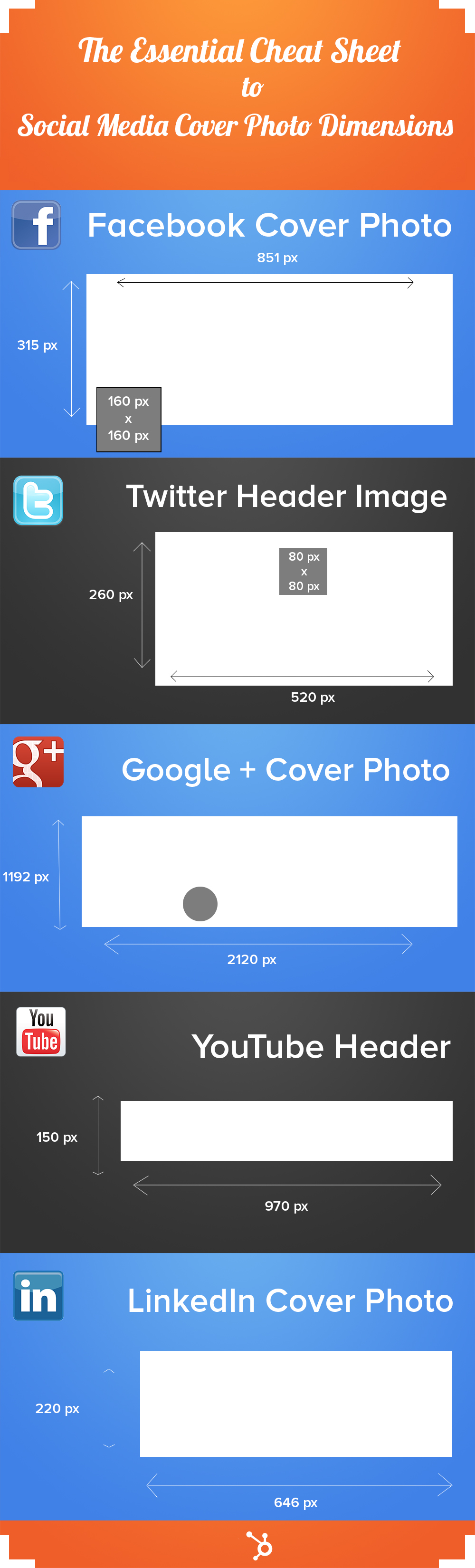
The Cheat Sheet for Social Media Cover Photo Dimensions

This article was originally posted on hubspot.com by Anum Hussain.

The rapidly growing user bases of photo-centric sites like Instagram and Pinterest, and the recent image-focused redesign of Facebook’s News Feed are two of many indicators that visual content is a force to be reckoned with in marketing.

According to 3M Corporation90% of information transmitted to the brain is visual. And on Facebook alone, our own research shows thatphotos generate 53% more likes than the average post.

Recent trends and studies are clearly highlighting a new wave of visual content consumption patterns. Even if you’ve never designed anything before, or never even dreamed of being a designer, in order to succeed in today’s marketing world, you need to create visual content. And not having enough budget is no longer an excuse either, as improved technology and access to tools and software has made it more and more possible for mere marketing mortals to work on their design chops.

To help you get started with visual content, this post will specifically give you a helpful cheat sheet you can bookmark and reference when creating the cover photos for your business’ various social media accounts.

The Essential Cheat Sheet for Social Media Cover Photo Dimensions

Fortunately, most social networks automatically re-size the photos you upload to your company pages. Here is a list of instances in which youdon’t have to worry about resizing images or creating visuals using a particular dimension:

  • Facebook album photos
  • Facebook mobile image uploads
  • Facebook Timeline image uploads
  • Pinterest pins
  • Pinterest album covers
  • Twitter photo tweets
  • Google+ news feed photo uploads
  • LinkedIn photo links

However, if you upload a cover photo to one of your business pages that is the incorrect dimension for that given social network, your image may get warped or cropped. This is definitely not ideal for brands looking to put their best foot forward in social media.

The following cheat sheet, created by our inbound designer Desmond Wong, will highlight the different dimensions you should be using for your various social media cover photos. And to help make things easier, we’ve also built free-to-download, pre-sized PowerPoint templates for each of the following social networks for you to use as your design canvas. Just add your creative to a social network’s corresponding slide, save it as an image file, and upload it ensure your design is optimized for that social network. Easy as pie!

Essential_Cheat_Sheet_to_Social_Media_Cover_Photos

You can download your free cover photo templates in PowerPoint here (template example pictured below). The download also includes our new free ebook, Design it Yourself: The Marketer’s Crash Course in Visual Content Creation, which walks you through everything you need to know to start designing visual content yourself — no previous design experience required!

facebook-cover-photo-size


#HashtagsIn2013: A Hashtag How-To for Businesses

This post first appeared on Social Media Today and was submitted by: Tomeeka Farrington

hashtag strategy

If your company regularly uses Twitter, then you know how crucial hashtagging is to a successful social media campaign. Unfortunately, Twitter’s popular method of interest-driven communication is about to have a contender in the ring it didn’t expect: Facebook. But don’t get too excited just yet; the social media giant is planning to unveil hashtagging capabilities on its site in the not-so-distant future. Coupled with an updated News Feed interface, this could be the push Facebook needed to catapult itself into the advertising go-to for the digital age.

How can your business make the best use of its hashtags? Simple. #Don’t #Hashtag #Every #Word. Every social media maven knows that populating a Tweet or a photo on Instagram with every other word hashtagged is the PR intern mistake of the year. Hashtags should #looklikethis (no spaces!) and if you want to drive your point home, use capital letters to make your tag #EasytoRead.

Starting a hashtagged phrase is a great way to gain new customers.  It also allows companies a way to drive customers to their business through creating unique tags that represent their brand or message. Creating a catchy hashtag campaign, such as Paramount Farm’s use of #CrackinStyle during its ad in the 2013 Superbowl is a great example of unique hashtagging opportunities. This will ensure that your message isn’t lost in the hashtag spam, thus cluttering the commonly used tags for your industry.

Hashtags are a great way for companies to give further insight into an image or product. They allow for categorization, interest honing, and drive targeted consumer purchases. Think of hashtags as warm leads. If a tag is used properly, you will find that clients found it through researching the broad scope of your product or service. (Examples Include: #Tech, #Apparel, #Outdoors, #Gaming, etc.) Using hashtags to draw attention to a particular part of an image, spec of a product or app, or new design is ideal. You can keep hashtags broad spectrum or niche to your industry—the opportunities are endless! Be forewarned that many popular tags are, as we said—overpopulated. This is why creating a unique hashtag specific to your brand, and encouraging your users to use it is crucial to success.

Facebook aims to reportedly group user interests through the use of hashtags, but its ultimate goal is to get them to sell ads. Using hashtags to drive attention to a promoted Facebook post will be a great way to gain attention when hashtags finally roll out on your client’s news feed.

Keeping your hashtag campaign thriving in 2013 is simple if you follow these steps:

  • #KeepItShort – Nobody wants to see a #Hashtagthatlookslikethis. If you must use a longer message, make use of capital letters to separate words and enable readability.
  • Create a message – What do you want your clients to takeaway? Craft a hashtag around a particular message. Make yourself unique.
  • Don’t stay with the popular crowd – It’s easy for your social media post to get lost in the shuffle if you use a well populated hashtag.

What has worked for your business in the world of hashtagging for social media campaigns? What hasn’t? Do you have a hashtag nightmare to share? We’d love to hear your story! Connect with us in the comments below.

5 Ways to Be Banned By Google Overnight

This article first appear on Website Magazine 3/19/13

by 

Google’s algorithms may be a black box, but its Webmaster Guidelines are meant to leave little room for speculation, yet some gray area remains. While the guidelines are written in easy-to-use language and outline some of the illicit practices that may lead to a site being removed entirely from the Google index or otherwise impacted by an algorithmic or manual spam action, there are no real-word examples, albeit for good reason. 

Here are past and present examples of how to get your website banned by Google overnight.

1. Participate in Link Schemes

Any links intended to manipulate a site’s ranking in Google search results may be considered a link scheme, as was the case in 2011, when the New York Times uncovered a link-building scheme by J.C. Penney. The retailer ranked number one for bedding, dresses, area rugs, and other vague and specific keywords, with “uncanny regularity” for several months. After consulting with an industry expert, the New York Times found 2,015 pages with phrases like “casual dresses,” “evening dresses,” “little black dress” or “cocktail dress,” which all bounced directly to the main page for dresses on JCPenney.com.

NYT excerpt: There are links to JCPenney.com’s dresses page on sites about diseases, cameras, cars, dogs, aluminum sheets, travel, snoring, diamond drills, bathroom tiles, hotel furniture, online games, commodities, fishing, Adobe Flash, glass shower doors, jokes and dentists — and the list goes on.

J.C. Penney said they did not authorize and were not involved or aware of the posting of links that the New York Times sent to them. J.C. Penney immediately fired their SEO agency, but not before Google took manual action against the brand for violating its guidelines. Overnight, J.C. Penney was vanished from search results for anything other than branded keywords (a.k.a. direct searches for J.C. Penney). It took about three months for J.C. Penney to move up the rankings and regain lost rankings.

Build links the right way with Website Magazine’s Big List of Link-Building Strategies

2. Include Doorway Pages

Google defines doorway pages as those that are large sets of poor-quality pages where each page is optimized for a specific keyword or phrase. Google always frowns upon manipulating search engines and deceiving users. In 2006, BMW suffered Google’s wrath for setting up doorway pages to attract search engines and redirect traffic to its German website, BMW.de.BMW’s page rank was reduced to zero. While BMW stated it did not intend to deceive users, the company added, “However, if Google says all doorway pages are illegal we have to take this into consideration.”

3. Sell Links that Pass PageRank

Selling links that pass PageRank violates Google’s quality guidelines; this includes advertorial pages with embedded links that pass PageRank. Google recently penalized Interflora, even removing it from branded search results, for using advertorials to solely influence search rankings. An example of this, is that Interflora reportedly sent bloggers floral arrangements in exchange for links. This was once considered a gray area, but is clearly black hat now.

Google’s Matt Cutts responded, indirectly, to this incident with this blog.

4. Scrape Content

In 2012, Google blacklisted a network of websites run by the family of U.K. Parliament member Grant Shapps after the search giant found the sites breached rules on copyright infringement and that they were based on scraped content. This latter black-hat tactic is typically when webmasters use content from other sites to try to increase credibility and the volume of pages.

According to Shapps’s spokesman (as reported by the Guardian UK), the Parliament member “is quite simply not involved in this business.” Certainly, it was avoidable bad press nonetheless.

5. Use a “Bad” Blog Network 

If your site belongs to a blog network whose purpose is to create backlinks, Google will de-index them and penalize you. In 2012, this happened to Build My Rank, which ultimately closed down and relaunched as HP Backlinks. The relaunch, however, has many people wondering if (and when) Google will go after the network again.

Check out this guide to identifying bad links and disavowing them.

Bonus: Start Cloaking — If you want to get on Google’s bad side, present different content or URLs to human users and search engines. Google bans this practice, because it provides users with different results than they expected. Unfortunately, some sites unknowingly use cloaking. For example, if your site is compromised, hackers may use cloaking to make the hack harder for the site owner to detect. Use Website Magazine’s cloaking checker to avoid a penalty.

5 Video Strategies for Merchants

by 

This post first appeared in Website Magazine.

A strong video strategy can provide merchants with many benefits – from an increase in engagement and conversion rates to better placement within the SERPs.

The biggest challenge with video, however, is creating content that will engage consumers and entice them to hit the play button. While many merchants implement video on their sites, often times their video strategies are limited to product videos and demonstrations for specific items. Although these types of videos are definitely helpful, they aren’t very engaging and are rarely available for every product on an e-commerce website.

In order to harness the true power of video, merchants need to create a more robust and innovative strategy that not only showcases their products, but is also interactive and makes consumers want to hit play. Luckily, Website Magazine has compiled a list of five tactics that can help merchants revamp their current video strategy to get better results, check them out below:

Go Live

Brands that want to stay a step ahead of the competition should consider implementing a live video strategy. One way this can be done is with the Your BrandLive platform, which is a video communication software that uses live video and chat to create a unique customer to brand experience. In fact, brands can use the service to broadcast live video from any location and participate in real-time interactions with customers. Moreover, merchants can sell products during video sessions by uploading items into the Brandlive dashboard. By doing this, products are displayed across the bottom of the live video with titles, descriptions, images, prices and a call-to-action button for making a purchase.

That being said, merchants can also go live on Google+ with Google Hangouts. This feature can be used to video conference with up to ten people at a time, as well as live-stream a broadcast publicly onto Google+, YouTube and websites. This could come in handy when revealing a highly-anticipated product for the first time.

Start Advertising

According to comScore, U.S. consumers watched 11.3 billion online videos in December 2012, which proves that video advertising is a big business. Furthermore, video ads tend to be successful because consumers typically either have to choose to hit play in order to view the advertisement or have already decided to watch a video (meaning they are alert) when the advertisement is shown. Merchants can launch video advertisements through Google, as well as on video ad networks like BrightRollLive Rail or Adap.TV. Additionally, LinkedIn recently announced video ads on its self-serve platform, which could be a good place for B2B merchants to display their advertisements.

Promote User-Generated Reviews

Most merchants know how influential consumer reviews can be, so why not feature them in a unique way? Yes, we are talking about video reviews. In fact, there are a variety of platforms available that allow merchants to include user-generated video content on their site, includingBravoAuthntk and EXPO TV. These videos could even prove to be more valuable than written reviews, because it is easier to tell someone’s sentiment when you can watch them speak, which makes this type of user-generated content more personable, relatable and believable.

Get Social

It is important to use a multi-channel approach when implementing a video strategy. By maintaining a YouTube channel and cross-promoting that content on other social sites like Facebook, Twitter, Google+ and Pinterest, merchants have the ability to show their products to a wider audience. Moreover, merchants can use their social videos to create a variety of content outside of tutorials and demonstrations, such as entertaining spoofs or a behind the scenes look at a company.

Videos for Every Item

Just because you have updated your current video strategy to include some of the aforementioned tactics, doesn’t mean you should neglect adding or updating product videos/demonstrations on your site. After all, product videos are helpful to consumers who are on the verge of making a purchasing decision, which means having a video on every product page could potentially have a dramatic influence on conversion rates. That being said, creating videos is time consuming, which is why platforms like Treepodia can be very helpful to merchants. This is because Treepodia can be used to turn entire product catalogs into product videos. The platform does this with Image Reviving Technology, which brings still photos to life. Moreover, the videos are always kept up-to-date as the platform automatically generates new video versions to reflect changes in inventory and all videos are based on existing product images, descriptions, prices, user reviews and merchandising rules.

The Once-A-Week SEO Checklist

This article first appeared in the 1-8-13 issue of Website Magazine.

by 

A new year always brings about new possibilities, which are often predicated on the many resolutions we all make to improve our lives and work during the course of the year.

It’s possible that many of the hardworking webmasters and website owners have resolved to improve or amp up their search engine optimization (SEO) efforts this year to help them find more relevant consumers and increase conversions. However, many of these same Web workers will quickly find themselves faced with the same problems that plagued them in the year’s passed, most notably a lack of time in an already busy schedule.

No need to worry, though, because here’s some good news for you: It’s possible to maintain a healthy SEO campaign by (mostly) conducting a check up once a week that examines the most important elements of your website for moving up the search engine rankings, allowing you to identify and correct any issues you may be having. And the best part is, once these larger problems are corrected, it will help improve many other aspects of your overall SEO performance.

Just make sure that you regularly follow a version of this SEO checklist once a week, and get ready to watch the inevitable upward progress of your search marketing efforts.

– Use Google Webmaster Tools to check sitemaps

To start, simply sign into your Google Webmaster Tools account (actually, if you don’t have one, the first step is to register one), which can help you quickly identify any issues with your domain. Primarily, you should use this service to make sure your sitemaps don’t have any errors and to review how many of your pages have been indexed. If you find that you have some missing pages, that’s a pretty good indicator that you need to submit a brand new sitemap.xml to the search engines.

– Don’t forget to look for crawl errors, too

Google Webmaster Tools can also help you spot any crawl errors (pages “not found” or broken links) on your site; if these issues are uncovered, they should be considered top priority fixes. In addition, this tool can help you check up on your site speed, HTML problems, such as short or duplicate metadata, and links to your site.

– Look for (and fix) broken links

Having a bunch of dead links on your website is going to hurt your standing with the search engines, so you should make it a point to regularly look for them by using a tools like Dead-Links.com to crawl your website and point out any hazardous hyperlinks that you are unaware of. And once you know which links are bad, you can easily fix or get rid of them.

– Tune up title tags

If you’ve put any effort into your SEO until now, every page on your site should have its own unique, descriptive title (as indicated in the HTML <title> tags), but as we all know, the more pages one adds to his or her site, the harder it is to constantly ensure that every page is given an appropriately SEO-friendly title. If you have a somewhat small site, you should be able to check all of your pages manually pretty easily, but for larger sites, Google Webmaster Tools will gather and present this information to you in a new “Content Analysis” section that can be found under the “Diagnostics” tab.

– Revise meta descriptions (as needed)

Although meta page descriptions don’t have a huge impact on search rankings, they can play a major role in convincing users to click-through to your site, so its worth giving them a once over on a regular basis, especially if you add a lot of new pages from week-to-week. In particular, you should look to make sure you don’t have any duplicate descriptions on your site. Good descriptions should be between 150 and 160 characters and made up of compelling copy that smartly uses crucial keywords, without using quotation marks or other non-alphabet characters.

– Follow the trends

Using an analytics platform like Google Analytics, check the daily, weekly and long-term search traffic trends to see what users are responding to and what isn’t working. Find out which of your pages have increased search engine traffic and which ones have had the opposite effect, and then figure out the reasons for why this is the case. Ultimately, you should have a solid idea/starting point to look at the problems on your site that need to be addressed, as well as the opportunities you have to increase search traffic based on user data.

– Add internal links when possible

Search engines use internal links to determine which pages the website owners think are the most important on the site, so to help your rankings and show off your best stuff, look around your site for ways to include links to these power pages. This is especially easy (and important) if you are consistently adding new content.

– Seek out your best search phrases and use them a lot

Thanks to – you guessed it – Google Webmaster Tools, webmasters can now find out what search phrases are leading users to their virtual door. By going to the “Statistics” tab and look at “search queries,” you’ll see the top 20 search queries that your site is appearing in, which can help you assess the performance of your current keyword campaigns and maybe even discover a few new ones hadn’t even thought of. With this information in tow, you can use TrafficZap’s keyword density tool to receive a report about the words and phrases that appear most densely on the page of the URL that you enter; this will help you figure out just how well you’re using your keywords and phrases on your site, and make adjustments accordingly.

Going Local on Facebook in 2013 – What’s Nearby?

This article first appeared in Websites Magazines January 2, 2012 issue.

by 

As the social Web continues to expand with more ways for brands to connect with their customers, there is still one network that outperforms the rest – Facebook.

This is because the world’s largest social network allows brands of all sizes to reach a user base that includes 1 billion active members. However, in order to reap the benefits of such a large user base, businesses must first foster a community of fans and then work hard to stay visible within users’ newsfeeds and the search results.

However, the strategies for becoming more visible on Facebook vary greatly depending on the size of your business. For example, global brands need to focus on providing relevant information to fans around the world, while small businesses should be more interested in engaging their loyal consumers and attracting a larger number of local fans. Luckily, Website Magazine has put together a guide to help both large- and small-sized businesses find Facebook success with a local audience in 2013:

Big Businesses

Facebook made the localization process much easier for international businesses back in October when the company launched Global Pages. The Global Pages structure allows brands to provide a better-localized experience to their customers because fans are automatically directed to the best version of a Page based on the country where those users reside. In fact, Global Pages enable brands to offer localized cover photos, apps, milestones and “about” information to their audience members without taking them away from the brand’s global community.

Each brand’s Global Pages structure includes local Pages for specific markets and a default Page for all other markets. Users from all countries see the same Page name translated in their local language, and each brand uses only one URL to promote in off-Facebook campaigns. Furthermore, Global Pages provide businesses with global insights for fans in all countries. Moreover, brands that currently use a multi-page strategy are able to transition their existing Pages to the new Global Pages framework. Companies like Kit-Kat and the Holiday Inn are two companies that already leveraged this capability.

However, it is important to note that the Global Pages structure currently only works for countries and not for the state or city level. This means that businesses with multiple locations in one country, such as the United States, will need to continue using other strategies to reach local customers within various regions. These strategies could include posting geo-targeted status updates, launching region-specific advertisements, occasionally including a placemark within posts and maintaining updated location information for all brick-and-mortar stores within the “Map” app on Brand Pages.

Small Businesses

While Facebook made the localization process easier for global businesses in October, the company helped level the playing field for all brands in December. This is because Facebook updated its “Nearby” feature within the company’s iOS and Android applications to make it easier for users to discover nearby places while on the go.

The updates enable users to discover local destinations that friends recommended, checked in at or liked when they tap the Nearby tab within the app’s vertical menu bar. After checking in to a location, users can share information about their experience by rating or recommending places. This is good news for businesses with an active social following because results become more personalized based on the amount of people who rate, recommend and check in to places – meaning that local businesses can move up in the search results with positive reviews, ratings and frequent check-in activity.

Local business owners can optimize their brand’s visibility within the Nearby search results by maintaining a Page that includes updated location information and the correct category listing. Furthermore, Page owners should encourage or incentivize their fans to like, check in, rate and recommend their places on Facebook. It is important to note, however, that even though optimizing your Page to show up in the Nearby search results should prove to be profitable, small businesses can also implement some of the aforementioned big business strategies to attract local customers, such as posting geo-targeted status updates and advertisements.

Mobile, Social and Local in 2013

Due to mobile’s rising popularity and use, expect localization to be among the top trends of 2013. That said, many consumers leverage social networks on their mobile devices, which means that appearing in the local search results on networks like Facebook will be more important than ever for businesses of all sizes. This is why it is vital for brands to maintain a presence on social networks to not only communicate with customers, but also to be found.