The first 5 online resources to use when learning to code

By Jillian Kumagai and first appearing on Mashable

Code-school-codecademy-thumb

Even if you think the buzz around “learning how to code” is overkill, you have to admit it’s here to stay.

Just like it’s easier to learn a foreign language if you start in grade school, getting an early grasp on mark-up and programming languages such as HTML, CSS and Java ensures you’ll have an idea of what makes our digital lives and devices tick, even if you don’t plan on becoming a software developer.

Zach Sims, co-founder and CEO of Codecademy, tells Mashable that learning how to code is reasonably easy for beginners, especially people under 18.

This year, Codecademy set up initiatives in England, Estonia and Argentina to bring coding education to young students — England and Estonia both added coding to their national curricula. As a result, Sims and the team found that “people in high schools can start with actual programming, and more advanced students in middle school can do the same,” he says.

The key, though, is making the learning process interactive. A favorite catchphrase of those who advocate coding education is “learn by doing,” and Sims repeats the sentiment. In the past few years, this has led to a surge in educational tools that favor project-driven learning over lectures. The good news is, there aren’t any prerequisites.

Start off easy with these five online resources, for kids and adults alike, to help on your way to becoming well-versed in code.

1. Scratch

scratch

“It’s never too early to start with something like a Scratch,” Sims says.

Scratch is an MIT project that builds a graphical processing language (“Scratch”) out of which you can make animated characters on a screen move. While Scratch isn’t something you could use to build a website, it does teach algorithmic thinking as well as the the concepts of a computer language, and it can smooth the transition to using HTML and CSS.

2. Code.org

code.org

Code.org’s mission is to expand the number of students, especially women and people of color, with access to the learning tools for coding languages. The exercises available on its website are formatted like games with drag-and-drop tiles, but users can view the code they’re building during the challenge and when it’s completed.

You can even make Elsa from Frozen walk 100 pixels, make a right turn by 90 degrees and walk another 100 pixels, just by typing “moveForward(100); turnRight(90); moveForward(100);” in Javascript.

3. Codecademy

codacademy

As soon as users sign up with Codecademy, they can start learning how to design their own websites with HTML and CSS, and animate their own names with Javascript.

Sims says that Codecademy helps students by allowing them to “write a line of code, and you see what happens immediately,” instead of passively watching an instructor. Students also benefit from being asked to build recognizable websites, such as Etsy, with Ruby on Rails.

4. Harvard’s CS50

CS50, Harvard University’s intro computer science course, enrolls more than 800 in-class students and thousands of online auditors. The syllabus includes general concepts as well as languages, and there are videos and problem sets online that allow students from all over the world to follow along.

While it’s not as hands-on as Codecademy, people looking for a more traditional computer science education should check it out.

5. Treehouse Club

treehouse
treehouse2

While Team Treehouse isn’t free — it costs $25 for a basic plan and $49 for a pro plan (which gives you access to exclusive workshops and interviews) — it’s arguably the most in-depth learning tool for coding and covers a wide variety of topics.

Treehouse also has special tracks, such as web design and iOS development, for users who have specific endpoints in mind for their coding education.

BONUS: Teaching Kids to Code with a Board Game

http://c.brightcove.com/services/viewer/federated_f9?isVid=1&isUI=1

Your Start-to-Finish Guide to Using Google’s Disavow Tool

by Marie Haynes and first posted to Moz.com

Have you used Google’s disavow tool? You might want to. If you have been actively involved in SEO for your website over the last few years, there is a good chance that you have unnatural links pointing to your site. These can hurt you in the eyes of Google’s Penguin algorithm. Or, in some cases they can even get you a manual unnatural links penalty.

In this article we will talk about some very practical things that will help you when using the disavow tool. These tips should help you whether you are an experienced SEO or a small business owner who is trying to clean up a few unnatural links.

What is the disavow tool?

Introduced in October of 2013, the disavow tool is Google’s way of allowing you to ask Google not to count certain links that point to your site. You can find the tool here. And here is Google’s documentation on how to use the tool.

The scariest part of this documentation is this:

Google disavow warning

Using the disavow tool incorrectly can hurt you. You should only be disavowing links that you know were made with the intention of manipulating Google’s results. Many articles have been written to help site owners decide which links are unnatural. But, there are not many articles written that take you through the process of auditing and disavowing your links from start to finish.

My hope is that this article will help answer any questions you have about using Google’s disavow tool. If there is something that I haven’t covered, then leave a comment below and I will do my best to answer.

Creating an audit spreadsheet

There are many services out there that can give you a list of your links. Some of these are great resources for organizing your links into a manageable format. I’m not a fan of services that try to audit your links for you as I believe that manually reviewing each link is necessary. But, some of these tools may be useful when it comes to putting a link auditing spreadsheet together. This Moz post contains a good review of many of the tools that are out there.

If you would like to create your own list of backlinks rather than using a tool or a program, then here is what I would recommend:

First, download your links from all available sources

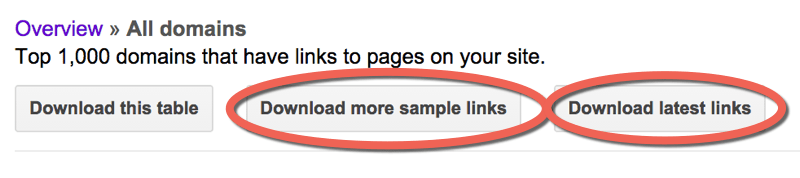
You will want to start by downloading your links from Webmaster Tools. When you go to Search Traffic –> Links to your site –> More, you’ll see this:
downloading links

Download both the sample links and the latest links.

Disavow Tip: If you have a site that has more than 1,000 linking domains, sometimes you can get more links from Webmaster Tools by downloading the sample list of links daily for a few days.

I would also recommend downloading links from the following sources:

  • majestic.com – Majestic has an option where you can get your links for free if you follow steps to verify your site. It’s definitely worth it.
  • opensiteexplorer.org – This is Moz’s tool. It won’t give you as many links as Majestic, but occasionally you can find some links in there that are not in the other sources.
  • ahrefs.com – This is a paid option. In my opinion, it is worth the money. I will often get links reported in ahrefs that are not found in any of the other sources.

Combine the links into one big spreadsheet

As you get your spreadsheet from each source, find the column that contains the url of the sites linking to you. Copy this entire column into a new spreadsheet. You can do this in Excel or in Google Docs. In the last year or so, Google Docs has gotten much better at handling large amounts of data. As such, the directions I’m going to give in this tutorial are for use in Google Docs as not everyone may have access to Excel. If you have a Google login or a Gmail account you have access to Google Docs.

You’ll end up with a big spreadsheet containing every link reported by each of the tools. At this point, this spreadsheet will contain a lot of duplication, but don’t worry, we will deal with this soon.

(Note: It’s not a bad idea to also include other columns that may help you with your audit such as the anchor text or nofollowed status, but for the sake of simplicity in this tutorial, we will just include the urls.)

Break these urls down to the subdomain level

Create a new column to the left of your urls. At the top type in the following formula:

=left(B1,find(“/”,B1,9)-1)

Then, highlight column A and press CTRL-D. This will fill the formula down the column and you will end up with something that looks like this:

url audit

Now, highlight column A and we’ll ask the spreadsheet to convert the formula results to values. You need to do this in order to be able to copy and paste in this column. To do this, do CTRL-C to copy and then select Edit –> Paste Special –> Paste Values Only.

Now we’re going to use the Find and Replace feature to break these down to the subdomain level. Keep column A highlighted and click Edit –> Find and Replace, and type in http://. Leave the replace field blank and press “Replace All”.

removing http from url audit

Now do the same thing for the following phrases:

https://

www.

Don’t forget the period after “www.”!

Once this is complete, then column A contains the domains/subdomains of each url.

list of domains and subdomains

De-duplicate so you just have one link from each domain

Now what we are going to to is dedupe this list so that we just have one link from each domain. Most spreadsheets have a dedupe function built in. However, I have found that when you are dealing with a large number of rows, this will often crash the spreadsheet, so what I do is first, sort column A using alphabetical order, and then create a new column to the left of my domains and add the following formula:

=if(B1=B2,”duplicate”,”unique”)

Copy this down so that the spreadsheet will now show you which entries are duplicates. You can then filter this column to show only the duplicates and delete each of these rows.

What you will be left with is one url from each domain linking to you.

Audit!

Now you need to visit each url on your spreadsheet and make a decision on whether or not you should keep links from this domain or disavow. On your spreadsheet, mark each url as either “disavow” or “keep”:

disavow audit

In some cases, I’ll mark some links as “debatable” and then review them again once I have seen all of the links in a link profile. Sometimes there are patterns of unnatural linking that only become visible after reviewing a good portion of the backlinks.

Here are the questions that I would ask when looking at each link:

  • Was this link made solely for SEO purposes?
  • Does this link truly, honestly have the possibility of directing clients your way?
  • Would you be worried if a Google employee or a competitor saw this link?

Disavow tip: When Google penalizes a site, or affects it algorithmically because of unnatural links, their goal is to demote sites who have been actively cheating. Every site has weird looking links that make you think, “Where the heck did that come from?” But there is no need to go disavowing everything that you don’t recognize. Penguin will not affect a site just because it has some odd looking links.

If you’re having a hard time deciding which links to disavow, then here are some resources that give more advice on how to make disavow decisions:

After reading those, if you are still unsure about the majority of your links and whether or not they should be disavowed, then it may be best to hire someone who is experienced in disavow work to do this audit for you.

Making your disavow file

Add “domain:” in front of the domains

Once you have finished assessing each link, you’ll want to filter your disavow column so that you just see the links that you have decided to disavow.

disavow or keep links

Then, create a new sheet on your spreadsheet, copy your domains column and paste it into this new sheet:

url spreadsheet

Now we’re going to add “domain:” in front of each domain name.

Disavow tip: You ALWAYS want to disavow on the domain level. If you disavow on the url level, you run a very high risk of missing bad links. For example, if you are disavowing a link onhttp://www.example.com/article.html, that same link may also exist on http://www.example.com/articles/ andhttp://www.example.com/tag/links, and http://www.example.com/article.html?utm=fb and so on.

To add “domain:” in front of each domain name, type the following formula into B1:

=”domain:”&A1

Copy this formula down the entire column. Then, as before, do a copy and then paste special –> paste as values.

Now you’ve got your disavow directives in column B:

domail list

Make a text file

Your disavow file has to be a .txt file in UTF-8 format or 7-bit ASCII. There are a few ways that you can do this. On my Mac, what I do is open TextEdit, copy and paste my “domain:example.com” column (column B), and then click “Format” –> “Make plain text”. I then save this as a .txt file.

Another option that works well is to create a new Google Doc document, copy the disavow directives into this document and then click “File” –> “Download As” –> “Plain text”.

Disavow tip: There are many other ways to make a .txt file. But sometimes these files create odd characters that can throw errors when you file the file. If you are getting odd errors once you file, then try creating your text file using the Google Doc method mentioned above. This seems to be the most reliable way to produce a text file that Google won’t reject.

What about comments?

I have seen disavow files that look like this:comments in disavow doc

You can leave a comment in your disavow file by starting a line with a “#”. However, no Google employee will look at your disavow file. It is completely machine processed. Comments are there just for your own use. I will insert comments where it might be useful for me when I’m editing the disavow file in the future. For example, I might say the following:

#The following links were disavowed on December 16, 2014. These links are ones that we know are low quality directory links.

Filing your disavow

To file your disavow file, go to the disavow tool, and select your site from the dropdown list.

filing a link disavow

Click “disavow links” and then “disavow links” again and then “choose file”. This is where you will upload the .txt file that we just created.

If you’ve been successful, then you’ll see something that looks like this:

successful link disavow

But, you may find that you have errors:

errors in link disavow

Common errors

Here are some things to look for if you have an error message:

  • If you have typed “domain:http://www.example.com“, you need to remove the http://www.
  • Sometimes the backlink tools will give you domains with odd characters in them that the disavow tool doesn’t like. For example, sometimes ahrefs.com will give me domains that look like this:
_¼_¡_á_ü_____ü__„â_µ„Û___µ„â.„Û„ã.com

If I try to disavow domain:_¼_¡_á_ü_____ü__„â_µ„Û___µ„â.„Û„ã.com, that’s going to throw errors. These domains never resolve. I just delete them from my disavow.

  • Look for domains with ports attached. For example, you may see domain:example.com:8080 on your list. Just remove the :8080. A colon will cause your disavow to throw an error.

As mentioned above, if you are getting errors and you can’t figure out why, try formatting your file with a Google Doc and saving as a .txt. This usually works for me.

Modifying your disavow file

If you have unnatural links, then it is a really good idea to do regular checks of your backlinks. I have several clients for which I do monthly backlink audits and even though they are not currently building links, each month I will see a good number of new unnatural links. Many of these are old links from as early as 2006 that are just surfacing now. Some are new spammy links that perhaps are the result of previous automated processes that continue to propagate. And some may even be attempts at negative SEO. My point is that most sites that I have seen that needed to have disavow work done will need to continually update their disavow file.

Disavow tip: When you upload a new disavow file, you are COMPLETELY REWRITING your old file. If your old file has 300 domains in it and you want to add 30 new domains, your new file will have 330 domains in it.

In order to update your disavow file, you’ll need to go to the disavow tool, select your site, select “disavow links” and again, “disavow links” and “download”. I have no idea why, but Google will give you your file in the form of a .csv and not a .txt file. What I do next is copy column A and paste it in either TextEdit (on a Mac) or into a Google Doc. You can then add your new links and save the file as a .txt and file it as before.

When does the disavow start to work?

As soon as you upload your disavow file, Google will start to apply the disavow directives to each link of yours as they crawl the web. Let’s say that I have a link on

http://www.spammysite.com/article.html

and I have disavowed

domain:spammysite.com

The next time that Google crawls http://www.spammysite.com/article.html, or any other page on this domain that links to you, they will apply an invisible nofollow tag to each link that points to your site. This means that these links will no longer be included in algorithmic calculations (i.e. Penguin) for your site. If your site is affected by the Penguin algorithm, you will not likely see changes right away. You will need to wait until Google reruns the Penguin algorithm and regathers information about your links. Google has hinted that soon this will happen continuously rather than on a sporadic basis. Hopefully this will mean that sites will be able to escape Penguin quicker. You’ll still need to wait for Google to recrawl all of the links on your disavow file though. John Mueller from Google has said that it can take up to a year for all of your links to get recrawled. However, in my experiments, the longest a link took to be disavowed was three months. Most links were disavowed within a month.

Should you be removing links as well as disavowing?

This is a subject that deserves its own article.  In fact, I have written a full article about this here. In general, if there is a link that I control, and I know I can easily remove it, then removing it is the best option. But, if you are dealing with an algorithmic issue such as Penguin, in my opinion, there is no need to go on an exhaustive email campaign to ask site owners to remove links. These campaigns are expensive and depending on the niche, the success rate is often very low. If you have a manual penalty, however, then yes, you need to make attempts to remove every unnatural link.

Can you reavow a link?

What if you made a mistake and included domains in your disavow file that were actually good links? You can remove a disavow directive by modifying your disavow file so that it no longer contains that domain and then re-uploading it. However, Matt Cutts commented earlier in the year that it takes much longer to reavow a link than to disavow it. You would think that the next time it was crawled, Google would remove the invisible “nofollow”, however, there is some type of lag time built in before the link starts to count again. The purpose of this is to make it harder for spammers to find ways to cheat the system.

Facebook Design Director: The 5 Most Common Design Mistakes

by Julie Zhuo and first appearing on fastcodedesign.com

FACEBOOK’S JULIE ZHUO ON THE BIGGEST TRAPS DESIGNERS FALL INTO—AND HOW TO AVOID THEM.

There’s no learning without mistakes. And I’ve done the following (as well as seen the following done) too many times to count. Luckily, there’s this thing called the “Internet” and this medium called an “article” that lets us point at and talk about mistakes behind their backs, in the hopes that by bullying them into the spotlight, they’ll have a harder time slinking around, wasting our time, and steering us toward no-good solutions.

1. OVER-CONSTRAINING THE DESIGN EXPLORATION

There are two main reasons why design explorations become over-constrained:

Time: Few things are more tempting to a product team than the promise of bringing about a positive change quickly. Between making a smaller product change and getting a small positive result out the door in three months, or making a larger product change and getting a bigger positive result out the door in six months, most teams I’ve seen pick the former, which necessarily constrains the exploration that designers will do. It takes Yoda-like patience to pick the latter. What can you design and build in three months? Small, iterative improvements. Which—don’t get me wrong—can be very positive up to a certain point (and is almost certainly the right thing to do if you’re happy with your product and just looking to grow it). But if you want people to behave or think in a substantially different way, you probably need to alter the model of how your product works. Always looking for the quick win isn’t going to lead to the kind of broad, creative design exploration that yields truly innovative solutions.

“DON’T FALL IN LOVE WITH YOUR FIRST IDEA.”

Risk: If you’ve got a reasonable thing going, you probably don’t want to upend it. You might wind up with something less effective than what you have now. And even if you do end up with something better, your users might hate it. There’s a huge tax in changing or introducing new things. Often, this fear of risk means people are afraid to even raise the idea of exploring bold new design directions. Resist this temptation. Have the conversation: Is the risk-to-reward tradeoff worth it to explore broader systems or model changes? The answer might be “no” most of the time, but it should be “yes” more frequently than it is now, when this conversation happens all too rarely.

2. REFINING TOO EARLY

This is a classic design mistake: you start off exploring a big, ambiguous problem. You have a cool concept in your head. You sketch it out. Looks sweet! Excitement builds! You start working on a high-fidelity mock or prototype. So sick! The design questions start piling up. Should you go with black or white as the background? Maybe the buttons should be round. Oh! This would be a great use case for that new nav idea you’ve been thinking about! Before you know it, 80% of the design time has been on refining one idea instead of exploring multiple ideas.

Maybe your first idea is always the best idea. Maybe you’re that person who touches things and then they turn to gold. I wouldn’t bet on it. You’re better off not falling in love with your first idea and instead doing broader explorations on a number of different systems, models, and approaches when you’re in the exploration stage. At this point, specific interaction and visual details only matter in that they need to be clear enough to support the story you’re trying to tell with your concept so that others can understand it and help you critique it. Any additional time spent refining the concept is like rearranging deck chairs on the Titanic. Too often, I see designers get so enamored with a deep dive on one idea that they don’t leave themselves any room to explore other very different—and potentially much better—ideas.

3. MISTAKING A GOOD EXECUTION FOR A GOOD PRODUCT

Scenario: a talented designer comes in with a polished prototype of beautifully laid out content containing professional photography of smiling, attractive people and super interesting content. There’s a tight and compelling narrative about how someone will use this product. Everyone is so wowed by the stunning nature of the presentation that not a lot of questions are asked. When something looks good, you sometimes trust that it is good.

“GOOD EXECUTION ISN’T THE FULL PICTURE.”

Alas, a good design execution isn’t the full picture, and will generally leave out a lot of the necessary ingredients required for the product to actually work well. For instance, the design execution may be awesome when you use high-res photos and well-formatted, rich content, but what if most of your actual content is low-quality meme photos? Or you’ve designed a bunch of features to give suggestions based on different cuts of data, but there’s not enough information in your system to support these features? Or you’re relying on people to have state-of-the-art hardware to support your slick animations, but it turns out a huge portion of them are running Gingerbread on 2010-spec phones? A good execution shouldn’t sell a design in of itself—there also needs to be deep discussion and understanding of the technical considerations, the content, and other constraints that might get in the way of the idea working in an idealized way.

4. OVERVALUING SIMPLICITY AND STYLE AT THE COST OF CLARITY

It’s well understood that designers have a great appreciation for aesthetics, which extends beyond the job into their lifestyle. So it stands to reason that designers want their stuff to not just be functional, but also to look and feel good. (And often beyond even that—to look and feel unique, so as to create for people a novel sensation of wonder and awe.) Unfortunately, it happens all too often that this desire gets taken too far, where in the name of aesthetics or style, usability for the app’s target audience gets compromised.

“WAY MORE PEOPLE IN THE WORLD ARE OFFENDED BY NOT BEING ABLE TO FIND A FEATURE THAN THEY ARE BY BAD KERNING.”

“Target audience” is important here because it sets the context for how to evaluate the success of the design. If you’re making an app for only other designers, then by all means, lose the labels. Make it gesture-based. Not a problem if your mom can’t figure out how to use it, as long as other designers don’t have any trouble. But if you’re making an app with the idea that lots of people in the world will use it, consider that being super explicit with labels and text, using tried-and-true interaction patterns, and resorting to familiar iconography is going to make people’s lives easier, even if it adds more clutter or feels less “innovative.” Way more people in the world are offended by not being able to find a feature than they are by bad kerning. Above all, consider that as much as we want to design something we ourselves love, it’s more important to design something that our target audience loves. (Otherwise, your work might get included in a post about perplexing design decisions.)

5. UNDERVALUING THE EXPERIENCE OUTSIDE OF THE CONTAINER

Every designer I know takes incredibly seriously the responsibility of crafting the experience within the container for which they are responsible, whether it’s an app, product, or website. Often, this attention to detail extends to not-very-frequently-used screens, like a superbly organized settings page, or a classy error pane. However, designers often neglect to pay as much attention to the things that get people into the experience in the first place.

“IT’S SIMPLY NOT TRUE IN THIS DAY AND AGE THAT IF YOU BUILD IT, THEY WILL COME.”

One of the most powerful levers to remind people of the value of a mobile app is through notifications, but there are far fewer designers who get super jazzed about figuring out the perfect system of rules to send out useful-yet-not-annoying notifications compared to those who are excited about, say, figuring out the visual system for an app. Another example is determining the best entry point for a new feature, an often contentious and therefore challenging endeavor, but probably more critical to its success than dozens of other things you could optimize within that feature. Or what about making it easy for someone to switch from using a competitor to using your app, like building in simple data transfer? And let’s not forget about marketing—how are people going to hear about this new feature or app? How should they think about it or talk about it? It’s simply not true in this day and age that if you build it, they will come. It’s important to consider not just what the experience is inside the container, but how people will get there.

How To Start A Blog

Janie reached out to me to ask if I would post this article on my blog. Since it is packed with some great information for anyone looking to start a blog, I was happy to share!

By Janie Mooney and Originally posted on wpreviews.net.

These days it seems like just about everyone has a blog, from your average individual to the world’s biggest celebrities and corporate brands. So what is it about blogging that’s piqued the interest of so many people and just how easy is it to set up your own blog? Read on to find out how to start a blog.

Why Start A Blog?

There are hundreds of different reasons why someone, somewhere, may want to start their own blog. Some people start blogs for purely personal reasons, whereas others blog professionally. Others look towards blogging as a way to escape the rat race and start their own business. Thankfully, due to the Internet this is possible. It will require a lot of work and effort but it’s possible to make a full time living from blogging and work from anywhere in the world. Sound good?

Blogging can be a great way to get your thoughts out on the Internet, if you’re a small business owner, blogging can let you build an audience in your niche and let you display your expertise around your subject. There’s so many different reasons to learn how to blog that’s it’s important you learn how to start a blog before rushing in. Rushing in can often lead to mistakes and wasted time. We aim with this guide on how to start blog to remove those barriers, get you up and running with your blog and give you advice on how to make your blog successful and start bringing in traffic.

This will be a pretty long post but it should cover all the basics and much more giving you tips and advice on how to start your blog and then how to make it a blog worth reading.

Ready? Let’s go.

We will start with a more detailed look into the reasons people start a blog in the first place.

Start-a-blog

Source

Documenting Your Life

Many people start blogs as a way to document their lives. When blogs first emerged on the internet they were often referred to as an online version of a diary, however unlike with a secret diary, your posts are available for the world to see! Writing a blog will give you something to look back on in the future.

Expressing Thoughts And Opinions

If you are particularly passionate about a subject or hobby and have something to say, blogging gives you a voice – a chance to share your thoughts and opinions with others. It is great for showing your knowledge of a particular subject and establishing yourself as an expert. This can be particularly beneficial for those seeking work or looking for a way to further their careers.

Community

A popular reason for starting a blog is to meet others and become part of an ever-growing online community. As well as using blogging to help others (perhaps by giving advice on certain subjects) and making new friends, blogging also provides a great way to keep in touch and stay connected with friends and family.

Promote A Business

Today it is not just individuals that blog, but businesses of all sizes too! In fact, blogging is one of the best ways that companies can engage with their target audience and drive sales. Writing a blog allows companies to share their expert knowledge, drive traffic through to their ecommerce websites and increase their visibility in search engine listings.

Now you have a reason to start blogging, let’s move on to why WordPress is the only platform you need consider.

how-to-start-a-blog

Source

Why WordPress?

Type something along the lines of ‘start a blog’ into Google and you will be presented with pages and pages of blogging platforms to choose from; however we can save you a significant amount of time by directing you straight to the WordPress.org website.

Read the rest of the article here.

5 Elements of a Successful Brand or Corporate Blog

by Alex Lirtsman and originally posted on Website Magazine.

Nowadays, it seems like every brand has a blog to round out its digital footprint. Some blogs are better at producing relevant content and others are better at posting an instant viral hit. But what does it take to find that sweet spot? Here are five elements for a successful brand or corporate blog.

THE STRATEGY

Asking “Why do we even have a blog in the first place?” is a great starting point. Blogging for blogging’s sake is costly and time consuming. It’s important to implement a strong overarching strategy and set multiple goals along the way as the blog grows and evolves. Such goals might include improving share of voice or using the blog as a lead generation tool. The strategy should include content types and themes that will resonate with the audience. This will make it increasingly easier to develop an editorial calendar and create content when wearing that lens. And that lens is so simple, yet instrumental to success.

THE EDITORIAL CALENDAR

There’s never been a more important time to have a working editorial calendar in place. It needs to contain a mix of evergreen content and timely content. This is the mechanism that will help brands define and curate content that their audiences will want to share. The brand may have a great blog in theory, but success really comes down to individual posts and assets and whether or not the content is shareable.

THE SEEDING STRATEGY

Brands can spend time creating great content that someone may eventually share, but there needs to be a strategy driving the initial content seeding. The “if you build it, they will come” model doesn’t work anymore. But what does work is figuring out the ways that content can be seeded (whether through owned or paid media) based on audiences and engagement.

THE VOICE

Consistency is key. The content that lives on the blog must match the brand voice and guidelines. It is critical to ensure that even though this content comes from the blog or drives someone to the blog, content shouldn’t live in a vacuum. Be prepared to solve the challenge of content consumption (articles, snippets, etc.) on multiple channels. Content will be and should be consumed on other mediums. And every single post must elevate the brand.

THE ANALYTICS

There’s a difference between reporting and analytics. Most brands tend to use the two interchangeably. Analytics are far more valuable, because they provide insights that brands and corporations can use to optimize the original content strategy and the blog’s content continuously. Use every single audience interaction as a feedback mechanism to improve.

A good blog will provide its audience with relevant content that resonates. A great blog that stands out among a crowded space will not only offer the same but also give its audience a reason to return.

Angular 2.0 is coming

by Santiago L. Valdarrama

Angular 2.0 is coming and we should appreciate it

Angular 2.0 is coming and it’s not going to be compatible with Angular 1.x. The current version of Angular will be in limited life support for several months before dying completely.

And it seems that everyone who loves/hate Angular is up in arms because of this.

Gosh, stop a second a think about it.

Angular was created a lifetime ago. Browsers are getting better and next year the problems we had when Angular was born will not exist (or they will be less of a problem.)

(…) you’ll also find a number of design changes aimed at adapting Angular to the recent tectonic shifts in the web platform (…), and making Angular significantly faster and easier to use in ways we couldn’t achieve in incremental steps from 1.x.

We need a framework to take advantage of what’s new. Backwards compatibility is nice, but it’s not what fosters progress.

I really respect the Angular team for making a decision this big. Haters are going to hate (they are already), but I applaud the team’s commitment to build a framework for the future.

Plus, who said there’s not going to be a migration path? Emphasis mine:

Our goal with Angular 2 is to make the best possible set of tools for building web apps not constrained by maintaining backwards compatibility with existing APIs. Once we have an initial version of Angular 2, we’ll start to work on a migration path for Angular 1 apps.

Is a Single-Page Application what you really need?

by Santiago L. Valdarrama and originally posted on his blog svpino.com

I’ve been developing Single-Page Applications for a while. I started using plain JavaScript, then jQuery, then a bunch of other crazy libraries, to then finally settle with AngularJS. I’ve been a fan since day one, and I believe users can benefit a lot from them.

By now I think I’ve learned what happens when a SPA is used instead of what should have been a regular web site. Nothing surprising here; there’s no silver bullet in any aspect of software development, specially when we are talking about the whole architecture of a web site or application.

My intention is not to make this post a rant about all the drawbacks of Single-Page Applications. Instead, I want to share their current status from my personal perspective and point out those situations where they can hurt more than help.

What’s a Single-Page Application?

If you don’t know what I’m talking about, here is Wikipedia’s definition of Single-Page Applications:

A single-page application (SPA), also known as single-page interface (SPI), is a web application or web site that fits on a single web page with the goal of providing a more fluid user experience akin to a desktop application.

That’s clear; is a way to bring a more fluid, desktop-alike experience to the web, but the best interesting part about SPAs comes right next:

In a SPA, either all necessary code – HTML, JavaScript, and CSS – is retrieved with a single page load, or the appropriate resources are dynamically loaded and added to the page as necessary, usually in response to user actions. The page does not reload at any point in the process, nor does control transfer to another page, (…).

If you don’t learn anything else from this post, at least keep in mind how a SPA works and why is useful. Thanks to this architecture, we can develop a better user experience through a more fluid interface by hiding all the complexity inherent to the web (requests, responses, etc.)

How do Single-Page Applications work?

The simplest definition of a web site is basically a set of pages with links between each other. Every time a user clicks on a link, the browser sends a request to the server to retrieve the new page and show it to the user.

In a regular web site, there are usually sections that are repeated across multiple pages: the header, the footer, maybe a side bar with links. The content area is usually the only one changing from page to page. One type of Single-Page Application leverages this fact, and instead of keeping separate physical pages around, embeds the content of multiple pages into one single page, keeping only the right content visible at a time. Whenever a user clicks a link, instead of having to request a full new page from the server, the SPA hides the current content and displays the new content in place.

Another type of Single-Page Application is all AJAX-based. In this case, only a bare minimum of HTML is served to the browser, and whenever the user engages, all the new content is retrieved using AJAX calls. Note that only the content that changes will be requested, keeping the user all the time in the same page with no reloads.

As you can imagine, the experience when using a SPA is faster and more fluid. If the content to display wasn’t downloaded from the beginning, and instead is being requested using AJAX, the experience still feels snappier to the user since only the portion that changes is retrieved behind the scenes. A Single-Page Application does most of the heavy work up-front by downloading everything that’s needed, swapping the content later on in place, or requesting just small portions of it.

Linking becomes an issue

Linking is the main problem with this approach: since a Single-Page Application is not actually keeping multiple physical pages but instead swapping and retrieving content from inside a unique page, there aren’t “real links” going out to “real pages”, but instead the linking schema is used in the browser to decide which particular section needs to be displayed or retrieved from the server.

Have you seen a hash symbol (#) used as part of a URL? It’s called a fragment identifier. This is what Single-Page Applications use to identify what content section to display or retrieve when a link is clicked. An example link in a SPA might look like this: http://www.example.com/#contact-us. Everything after the fragment identifier (contact-us in this case) refers to a subordinate resource to the default page (index.html). Using JavaScript, a SPA uses this information to select the proper section to display.

Note that fragments identifiers are never sent to the server. A request tohttp://www.example.com/page.html#section2 will be sent ashttp://www.example.com/page.html only, leaving the fragment identifier off the request. The fragment identifier needs to be processed then by JavaScript in the client side.

SEO implications

You’d agree with me if I say that Search Engine Optimization is one of the most important topics when building a web site. It doesn’t matter how good is your site if you aren’t discovered by your potential users. Unfortunately, creating a Single-Page Application has huge implications for SEO.

Since your pages are built in the browser, the search engine crawler will see a different version of the page than your users; when the crawler requests a page from your server, you’d either be serving the whole package containing all the content, or just a shell with AJAX hooks to execute and retrieve the proper content after the page is displayed. This, of course, causes the crawler to see either the wrong information, or not information at all, which will not help you to score well in their ranking algorithms.

Also, when the crawler sees a link, it will only request the base URL from the server leaving the fragment identifier off the request. This means that bothhttp://www.example.com/#contact-us andhttp://www.example.com/#about will end up returning the sameindex.html page from the server. If all the different sections are included as part of the the response, both URLs will look exactly the same to the crawler. If the content is accessed using AJAX instead, the crawler won’t see anything useful to index.

This is a big hurdle for web site developers. There’s a solution to this problem commonly referred as the hashbang approach, but it means adding server side code to return a static HTML snapshot of the page to the crawler and the regular code to the browser. Setting this up correctly makes the whole SPA approach very complicated and inconvenient.

Performance implications

Once the user starts interacting with a Single-Page Application, the whole experience will feel better than a regular web site, but depending on what approach is used to deliver the content to the browser, we might create a performance problem.

When using AJAX calls to retrieve different sections of the site, performance is less of an issue than when the whole content is embedded into one single HTML file and delivered all at once during the first request. Instead of downloading only what the user needs, we are forcing them to wait for the whole site before even knowing if they are going to visit past our home page.

Depending on what type of web site you are building, using this approach may be prohibitive for your users; they just don’t have the patience to sit tight while you display a blank page waiting for all the content to come through. This problem is amplified for mobile devices which usually suffer from very slow connections.

JavaScript support

I know. I shouldn’t be talking about this in 2014, but the fact is that JavaScript support is still an issue all across the globe. It’s not only a matter of what browser are our users using, but whether or not they have JavaScript enabled on the first place.

I can name (but won’t) a couple of high-profile companies with entire departments using IE8 with no JavaScript. If you want to count those users as yours, you need to stay away from web sites that heavily rely on JavaScript to present the content. It’s okay if they get a stripped-down version of your page with limited functionality, but it’s unacceptable if they can’t access it at all.

Conclusions

Does this mean Single-Page Applications are not useful? Not at all! I love them and they solve a real problem, but we need to make sure we use them only when they make sense.

I’ve found out that the sweet spot for a SPA are web applications instead of regular web sites. Web apps are not usually searchable (most of them are hidden after some sort of authentication wall anyway), so SEO is not an issue. Your users are already committed to the app. They want to use it, so they are willing to navigate any hurdles to get the benefits you are offering them by using a SPA.

A regular discoverable and public web site on the other hand is a different story. You need to weight all the pros and cons before making the decision of going with a SPA. It’s never a clear cut, so make sure you explore the implications before committing for the long term.

9 Reasons You Should Know a Little HTML and CSS

By ADDA BIRNIR for The Muse and posted on MASHABLE.

keep-calm-and-learn-to-code-2

You’ve heard over and over that everyone should learn to code. Alright already! But as a writer, marketer, finance guru or nonprofit worker, why in the world should you get into coding?

Well, I‘m here to tell you that even a little knowledge of HTML and CSS can make a big difference in your career. And learning tech isn‘t just for the production assistants and print designers of the world — whether you‘re a small business owner, a sales manager, an event coordinator or even a magician, you can benefit from some HTML and CSS chops.

Sound too good to be true? It‘s not, and I‘ll give you nine examples to prove it.

But, first, let‘s review what exactly HTML and CSS are. The short and sweet version is: HTML and CSS are the foundations of the web. HTML — HyperText Markup Language — is the language used to tell your web browser what each part of a website is. So, using HTML, you can define headers, paragraphs, links, images, and more, so your browser knows how to structure the web page you‘re looking at.

CSS — Cascading Style Sheets — is the language that gives those web pages their look and formatting. In other words, CSS is what you use to make sites look nice with fancy fonts, rich colors, gorgeous backgrounds, and even slick animations and 3D effects.

Easy, right? But you‘re probably still wondering: How am I supposed to use these coding languages in my job? Well, here are just a few of the amazing things you can achieve with just a few lines of these easy-to-learn languages. Trust me — your boss or potential employer will be impressed, your colleagues will be happy and you may be well on your way to a more fulfilling and lucrative career.

Here are nine things you will be able to do with your HTML and CSS skills:

1. Design an awesome email for your customers

Email is turning out to be one of the best online marketing tools out there. And you can make an email that your customers will actually look forward to getting by organizing and styling it using the HTML and CSS editors available with most email marketing services.

2. Create a stunning corporate newsletter

Now that you‘ve impressed with those gorgeous emails, take it to the next level with a newsletter template. HTML and CSS will be your secret weapons once again as you lay out and customize the template to fit right in with your corporate brand and style.

3. Tweak your company‘s WordPress site

A surprisingly high percentage of corporate websites are built on WordPress. And this is good news for you when you know some HTML and CSS, because you can use them to add content and make changes to your company‘s site. That means no more waiting around for your overworked web team to update the office calendar!

4. Teach your colleague (or boss!) some code

Speaking of overworked co-workers, how about sharing the HTML and CSS love with your colleagues (or even your supervisor)? Then everyone on your team will be able to update and improve the website, emails and newsletters. Ahh, the joy of delegation!

5. Make your technical team adore you

The developers in your working life will thank you if you understand even a hint of HTML and CSS. You‘ll know how to tell them what needs to be changed on the company site (instead of referring to everything as a “whatchamacallit“ or “thingamajig“ as well as be more aware of the limits and possibilities they face every day.

6. Show off your skills with a perfectly-tuned Tumblr blog

Want to leave that adoring team behind and turn your passion into your profession? It‘s easy enough to set up a Tumblr blog to show off that side hustle you‘ve been working on. If you want to send a dazzling display of your freelance photography or graphic design work to that agency that‘s hiring, you can! Just a bit of HTML and CSS can take a Tumblr template from so-so to stunning.

7. Build a professional resume site — from scratch!

Go beyond just a Tumblr blog and really show some initiative by coding your own online presence from start to finish. It might sound daunting, but it‘s actually surprisingly easy to create a simple but great-looking site with basic HTML and CSS. And, boy, will you knock the socks off potential employers when you tell them you did it all on your own!

8. Take your design skills to the next level

So you‘re already a Photoshop wizard, and you can even create some impressive website mockups. Well, get some HTML and CSS under your belt, and you‘ll be able to turn those mockups into actual sites. You can become the “unicorn“ (a designer who can code) every company is looking for right now.

9. Start learning more — and earning more!

Like I said at the start, HTML and CSS are the foundation of the web. So, they‘re also the foundation for taking your tech skills to the next level. Having a handle on the fundamentals will make learning another programming language (like JavaScript, Ruby or PHP) a whole lot easier. And the more you know, the more job opportunities will open up for you.

Developers – This is where the money is

By Jillian Kumagai and first published on MASHABLE.

Seattle is home to Microsoft, and Silicon Valley is home to Apple — that much is obvious. But if you want to see where the rest of America’s developers live, you’ll need to take a bit of a road trip.

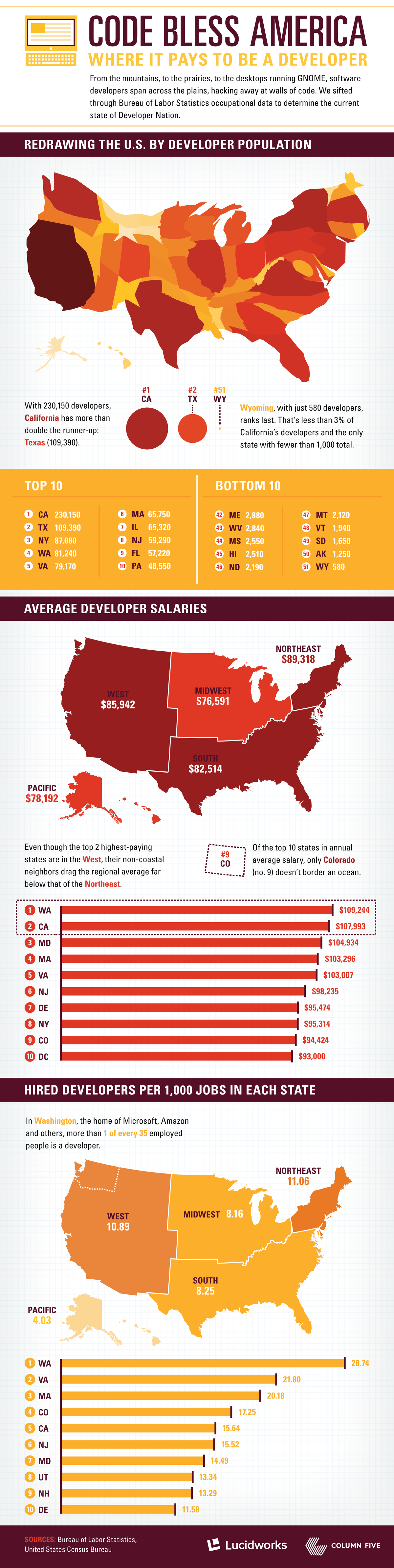
While California boasts the highest number of developers of any U.S. state (followed by Texas, New York and Washington), the Northeast takes the top regional spot when it comes to average salary, with $89,318. Washington, however, reigns supreme as the individual state with the highest salary: an average of $109,244.

There’s only one landlocked state that made the top 10 list according to salary — Colorado, where the average developer earns $94,424.

In the following infographic, the folks at Lucidworks redrew the U.S. map according to developer population. To find out more about those who code from sea to shining sea, take a look below.

LW_DevMap_D2b_1920px

The 10 Tech Terms You’re Mixing Up

This article appeared on MASHABLE and is written by  originally for The Muse.

Tech_terms

Do you ever find yourself trying to hide your confusion at work meetings while the tech team is tossing around terms like UI and UX? Or maybe you’re all about downloading the latest apps, but you’re not totally sure what “app” actually means.

Well, it’s time to stop faking it and start learning some of today’s most important tech vocabulary. We’re here to define 10 tech terms that you hear on the daily, and we’re using plain English (as in, even your Gramps would understand). No more excuses—here’s your chance to get in on the conversation, and earn a little tech street cred, too.

The Internet vs. the Web

Wait, there’s a difference? Oh, yes! (And no trying to avoid this one by referring to them both as “the interwebs.”)

The internet is actually millions of computers interconnected in a global network. (Get it? Interconnected + Network = Internet.) All of these computers can talk to each other to send and receive data around the world as fast as you can favorite a tweet.

The web, on the other hand, is the system where some (but not all) of that data is kept in the form of special documents. These documents are linked together and more commonly known to you and me as web pages.

To put it simply, the internet is the equipment and connections, and the web is the information. Fun fact: While “world wide web” was the hottest term for the web a few years ago, Millennials prefer to call it “the cloud.”

HTML vs. CSS

Speaking of the internet, here’s a bit more about how the websites on it are made. HTML — or HyperText Markup Language — is the language used to write web pages. HTML is made up of “elements” (paragraphs, headers, lists, links, and the like), which give each web page structure and contain the content of the page itself (text, images, videos, and so on).

CSS — or Cascading Style Sheets — tell web browsers how to format and style an HTML document. In other words, CSS is what makes HTML look good. Using CSS, you can give a web page its own font, text styles, colors and, with the newest CSS version (CSS3), even multiple backgrounds, 3D transformations, and awesome animations.

To put it simply, HTML holds the content in place, and CSS makes it look pretty.

Front End vs. Back End

Now you know how websites are made, let’s talk about how they work. The front end of a website is the part that you can see. This includes HTML and CSS (see how handy it is to know those terms!) and all the other things you look at in your browser. Think Facebook posts that update or Google search terms that autocomplete—these are all thanks to the powers of the front-end programming language JavaScript.

The back end of a website is the part of a website that makes it work. It includes applications that tell websites what to do, servers where websites get data from, and databases where information websites use is stored.

On Twitter, for instance, the look of your feed is the front end, and all the data is stored in the back end.

App vs. Software

Speaking of telling computers what to do, you’ve probably heard the term “application” before. In a nutshell, an application, or app, is a program or set of instructions that you can use to do certain things on your iPhone or Android.

The general term for any instructions for your computer, tablet, or phone is software. So, apps are just one type of software. But, system software—like operating systems (Think iOS7 or Windows 8), drivers (controls for your printer or speakers, for example), or utilities (like anti-virus or backup)—are a different type of software that run your computer as a whole and make it possible for you to use all those apps you’re addicted to.

That means: All apps are software but not all software is an app.

UX vs. UI

Even pros can get mixed up about these two abbreviations, but let’s make sure you don’t. UI — or User Interface — is how a product or website is laid out and how you interact with it: Where the buttons are, how big the fonts are, and how menus are organized are all elements of UI.

But UX — or User Experience — is how you feel about using a product or a website. So, your love for the way the new Apple Watch looks or your excitement that there’s finally a tablet-sized iPhone to watch those Corgi videos you’re obsessed with are reflections of UX.

So the new look of the Facebook news feed involves a change to UI, and the way you navigate that new page is the UX.

Now that you’re clear on some of the the most used-and-abused tech terms, get out there and prove to your co-workers (and maybe even your Instagram followers) that you know what’s what in tech today.

[ Here’s a recent article posted on my blog about the differences between UI and What’s the difference between UI and UX design? ]